Loading...


1ST QUARTER EXAMINATION IN TLE 8- ICT | SPECIAL PROGRAMS
Quiz by Eden Javier
Tag the questions with any skills you have. Your dashboard will track each student's mastery of each skill.
It is similar to the magnetic polygon Lasso Tool except that rather than dragging to make a selection, you click in a region and a selection appears around similar colored pixels.
This tool takes color samples from colors on the page and displays them in the Color Boxes.
This tool allows you to draw a selection by dragging the cursor freehand.
This tool makes various points which will define a selection and finish your selection by clicking the starting point.
This is a useful tool when dealing with well-defined and high-contrast images.
This tool paints your image in whatever color and size you have selected.
This tool is used to fill an image or a selection with any color of your choice.
This is used to lighten whatever area you use it on as long as it is not an absolute black.
This tool is used for drawing smooth-edged paths.
This tool allows you to move around within the image
This is what you use to change the color and appearance of the entire image.
This involves correcting the colors and brightness of an image.
This refers to the size at which the document will print.
This can provide more working area for your image.
This contains a bunch of icons that represent the different tools Photoshop offers to alter and create images.
This menu allows you to toggle back and forth between hiding and showing for each interface element.
This allows you to make changes to an image without altering your original image data.
This lets you open and close documents with a few extras including importing and exporting images.
This is located directly under the menus.
Yshalee Shelby will create a tarpaulin with the document size of 3 feet width and 2 feet height what is the value to be entered in adobe photoshop where the units is in inches?
This is used to adjust the transparency of an image.
This adjusts the amount of opacity of the pixels only, but any layer styles are unaffected and remain 100% opaque.
This will enable to you hide and unhide a layer.
This gives a special effect applied to your image layer.
Which of the following software is best used for photo editing?
It refers to the number of dpi that appear in your image final form.
What does dpi stand for?
This refers to regions in an image that will be affected by the various tools.
This uses lossy compression, which means it provides a reasonably high level of quality without a very large file size.
This lets you open and close documents with a few extras including import, which deals with scanning, and save for web, which allows you to export a web-ready image from your Photoshop file.
This basically is described as single transparent sheets which hold particular pieces of an image.
If you are working with graphics to be viewed only on screen what is the preferred resolution?
This is the preferred resolution for images.
What is the standard resolution for printing?
The following are image format EXCEPT for:
These are compiled using pixels, or tiny dots, containing unique color and tonal information that come together to create the image.
These images are made up of paths or line art that can be infinitely scalable because they work based on algorithms rather than pixels.
This is the smallest item of information in an image.
This compression type removes some information from the image and lowers the overall quality to reduce the file size.
This compression type does not remove any information from the image, but it typically cannot reduce the file size as much as lossy compression.
Which of the following is an example of a lossless file?
Which of the following is an example of lossy file?
This type of file is a multi-layer document that retains its full editing options when saved.
What is the color that stands for K in CMYK color Mode?
Which of the following is not an image file format?
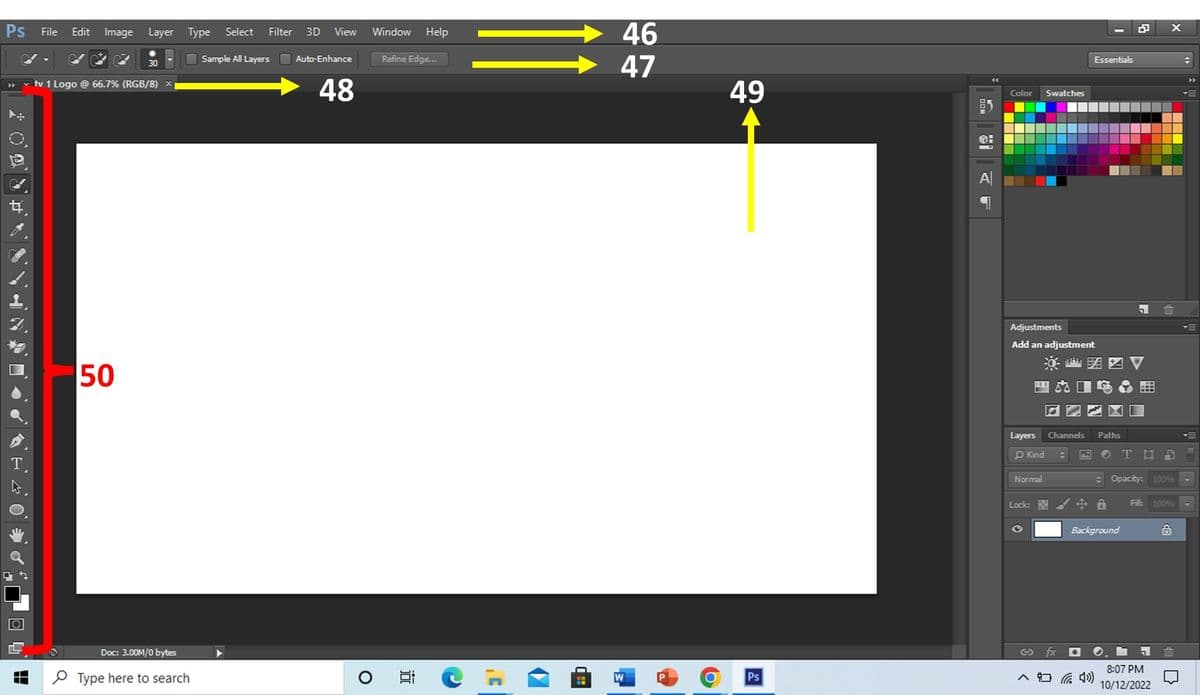
Name the part of Adobe Photoshop Inteface on Item Number 46

Name the part of the Adobe Photoshop Interface on Item Number 47.
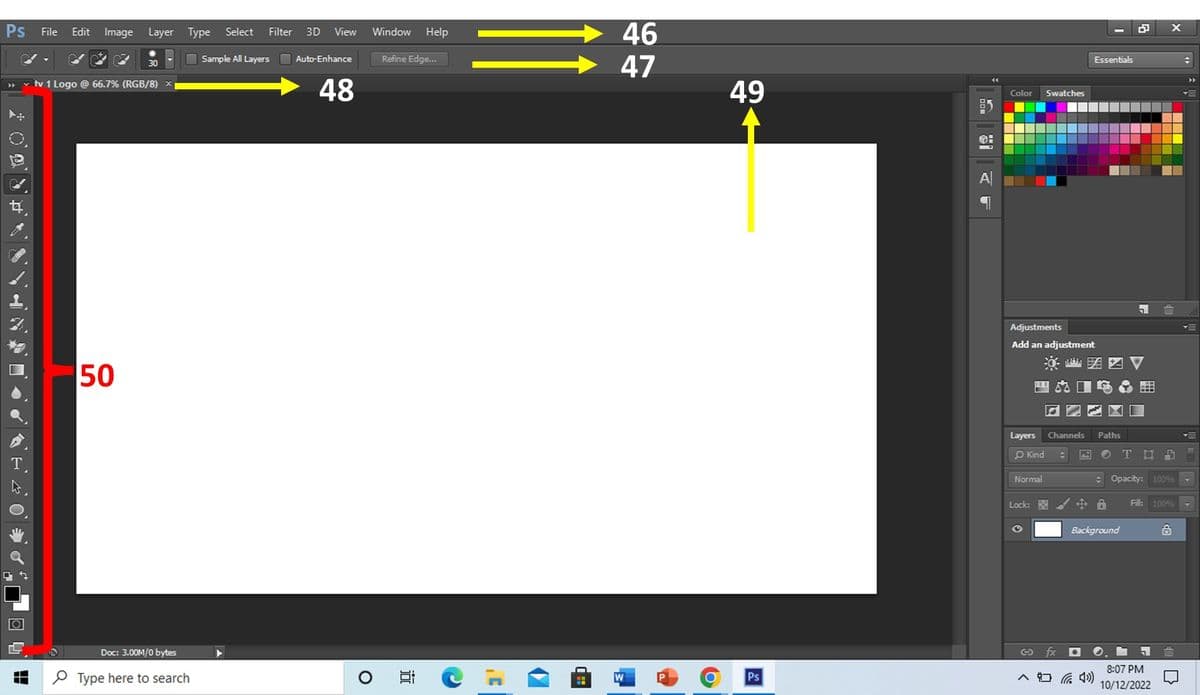
Name the part of the Adobe Photoshop Interface on Item Number 48.

Name the part of the Adobe Photoshop Interface on Item Number 49.
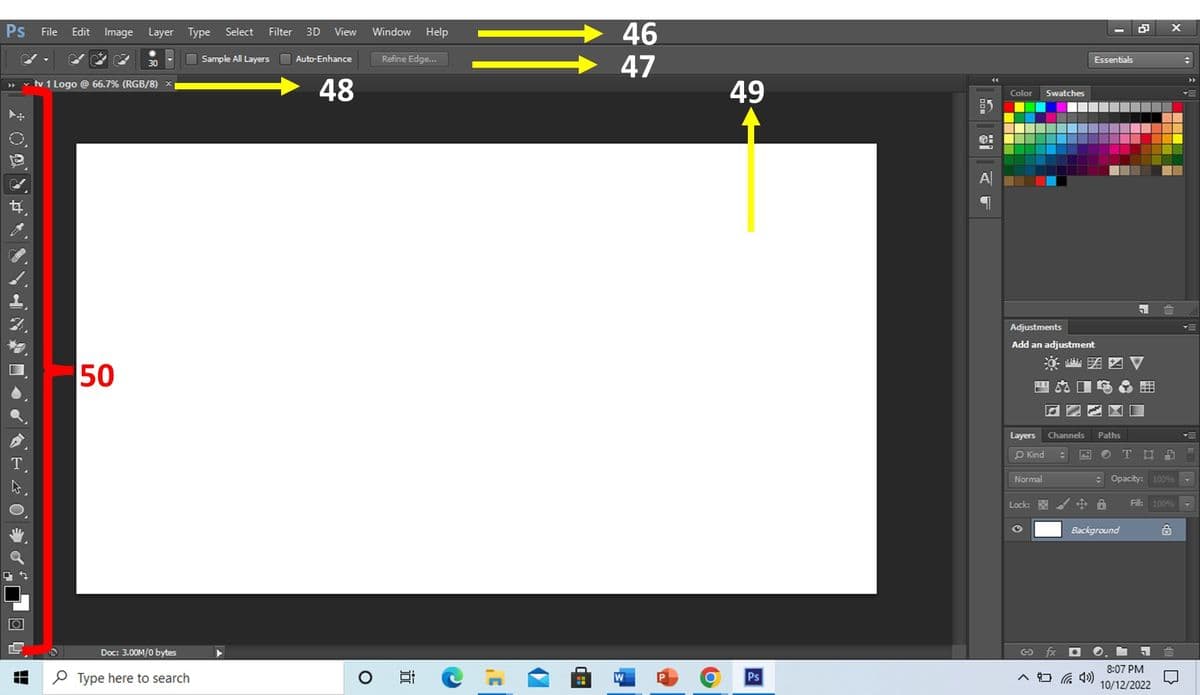
Name the part of the Adobe Photoshop Interface on Item Number 50.