Computer-8th Grade_Quiz-1
Quiz by Ustaz Yonis
Feel free to use or edit a copy
includes Teacher and Student dashboards
Measure skillsfrom any curriculum
Measure skills
from any curriculum
Tag the questions with any skills you have. Your dashboard will track each student's mastery of each skill.
With a free account, teachers can
- edit the questions
- save a copy for later
- start a class game
- automatically assign follow-up activities based on students’ scores
- assign as homework
- share a link with colleagues
- print as a bubble sheet


10 questions
Show answers
- Q1Where can you insert texts in PowerPoint program?You can insert text into text boxes only.You can insert text into placeholders or text boxes.You can insert text into placeholders only.You can insert text into Task Pane or status bar.60s
- Q2What is a PowerPoint Presentation made up of?It is made up of a series of layout.It is made up of a series of slides.It is made up of a series of titles.It is made up of a series of videos.60s
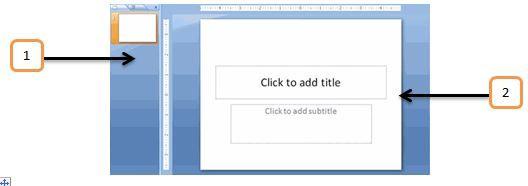
- Q3Based on the Image you see, What do part number 1 and part number 2 indicate?Number one is a Task Pane and number 2 is a status toolbar.Number one is a Task Pane and number 2 is a zoom toolbar.Number one is a Task Pane and number 2 is a placeholder.Number one is a Task Pane and number two is a Work area.60s
- Q4Which of the following is considered types of slide layouts in PowerPoint program?Section footer slide, Three content slide, and chart and images slide.Section header slide, Two content slide, and Comparison slide.Section header slide, no content slide, and differentiation menu slide.Which of the following is considered types of slide layouts in PowerPoint program?60s
- Q5How do you change the Slide layout in PowerPoint program?You can change the Slide layout in PowerPoint by clicking on the Form icon.You can change the Slide layout in PowerPoint by clicking on the Insert icon.You can change the Slide layout in PowerPoint by clicking on the icon.You can change the Slide layout in PowerPoint by clicking on the Layout icon.60s
- Q6How do you insert a new Slide in PowerPoint presentation?You can insert a new slide to a PowerPoint presentation by clicking the format slide icon.You can insert a new slide to a PowerPoint presentation by clicking the layout slide icon.You can insert a new slide to a PowerPoint presentation by clicking the edit slide icon.You can insert a new slide to a PowerPoint presentation by clicking the New slide icon.60s
- Q7What is a Microsoft PowerPoint application?It is a Microsoft software package that enables users to create Databases in slides.It is a Microsoft software package that enables users to preform calculations in slides.It is a Microsoft software package that enables users to create a presentation in slides.It is a Microsoft software package that enables users to save and print labels in slides.60s
- Q8What are the 3 different view options in PowerPoint program?Normal view, Slide the view, and Slideshow view.High view, Slide sorter view, and show view.Low view, Slide zoom view, and Slideshow view.landscape view, layout status view, and Slide view.60s
- Q9What are the 3 different Formats you can do to the text in a PowerPoint presentation?Format column size, Format text color, and Format row style.Format table size, Format slide color, and Format table style.Format slide size, Format slide color, and Format slide style.Format text size, Format text color, and Format text style.60s
- Q10How do you insert a text box into a slide in PowerPoint presentation?Select the Insert tab on the Ribbon, Click the Text Box command, and then Click and drag the cursor.Select the Design tab on the Ribbon, Click the Text Box command, and then Click and the cursor twice.Select the Format tab on the Ribbon, Click the Text Box command, and then Click and box symbol.Select the View tab on the Ribbon, Click the Text Box command, and then right Click and the cursor.60s