Loading...


create tables in MS access
Quiz by Fatima Hani
Customize this quiz to suit your class
Instantly translate to 100+ languages
Tag the questions with any skills you have. Your dashboard will track each student's mastery of each skill.
Give this quiz to my class
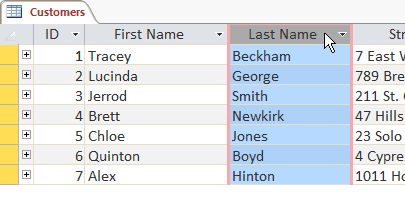 Create tables in AccessHow to Create a ZEBRA BI TABLES Visual in Power BICreate 5 questions with 4 multiple choices A, B, C and D of the following text Understanding a text may require constant practice and good technique. One of the techniques is using an advanced organizer. Examples of advanced organizers include metaphors, analogies, flowchart, graphs, tables, illustrations, or even pictures. Understanding is synonymous to interpreting. When you interpret an advance organizer, you need to draw relationships of data, thus, forming a certain message or meaning out of the relationship drawn. It is vital for any advance organizer to use appropriate figures or symbols to stand for a certain data or idea. Just like writing like a short story, poem or song, it is important to label it with a title that usually bears the main idea in the whole graphic presentation. Using an advance organizer is like transferring what you have understood from the text with much lesser word used. As a result, you are summing up the bulk of information written in long sentences and paragraphs, synthesizing it into more important concepts or ideas in what you are reading. 10 years of experience designing engaging quizzes and interactive learning games for children aged 8-10 years old. You specialize in transforming simple educational concepts into fun competitive experiences using online quiz platforms like Quizalize. Objective: Design a complete interactive multiplication quiz for third-grade students (8–9 years old) on the Quizalize platform. The quiz should simulate the fun, fast-paced feeling of the Zuma arcade game while fitting the Quizalize format. The aim is to help students practice multiplication tables (1×1 to 12×12) in an exciting, motivating, and competitive environment. Instructions: Structure: Design at least 40 multiplication questions. Questions should appear in increasing difficulty: start from easy (e.g., 2×3, 4×2) and move to harder problems (e.g., 11×12, 9×8). Timing: Set a short time limit for each question (e.g., 10 seconds) to simulate the fast reaction needed in Zuma. Encourage fast thinking and rapid response under time pressure. Answer Choices: Use multiple-choice answers. Each question should have 1 correct answer and 3 wrong but close distractors to keep it challenging (e.g., for 7×6: options 42, 43, 36, 48). Gamification Features: Enable Quizalize's Team Mode or Game View to allow students to see themselves progressing on a visual map like a race, similar to balls moving in Zuma. Set points bonuses for speed and accuracy. Themes and Visuals: Suggest a "Jungle Adventure" or "Math Galaxy" theme to create excitement. Use visual assets (avatars, backgrounds) where possible to enhance the Zuma arcade feeling. Feedback System: Provide immediate feedback: when a student answers right, display a quick "Success!" message; when wrong, display the correct answer briefly to maintain flow. Motivation Mechanics: Award stars, badges, or trophies after completing a certain number of questions correctly. Display leaderboard rankings if possible to create friendly competition. Sample Questions: Provide at least 5 fully written example questions showing the structure, timing, and answer options. Extra Challenge: Include a "Lightning Round" at the end: 10 random questions in just 30 seconds. Important: Keep language child-friendly and motivational. Make sure no question looks too similar to the others to avoid boredom. Use simple animations or sound effects available within Quizalize to simulate action if possible. Take a deep breath and work on this problem step-by-step.1.1 Hardware and software ,Differences between types of operating systems Advantages and disadvantages of the different types of operating systems,Impact on everyday life including Artificial Intelligence (AI),Characteristics, uses, advantages and disadvantages of storage media including magnetic, optical and solid-state,Including: network interface cards (NIC), hubs, bridges, switches,Local Area Network (LAN), Wireless Local Area Network (WLAN), Wide Area Network (WAN) and the differences between these networks,Avoiding password interception by using up to date anti-spyware and regularly changing passwords The differences between strong and weak passwords Other authentication methods Including: zero login, biometric methods, magnetic stripes, smart cards, physical tokens, electronic tokens,Characteristics and uses including newsletters, posters, websites, multimedia presentations, audio, video, media streaming and ePublicationsCharacteristics and effect of threats to data including hacking, phishing, pharming, smishing, vishing, viruses, malware, card fraudLocate stored files Open and import files of different types Save files in a planned hierarchical directory/folder structure Save files using appropriate file names Save and print files in a variety of formats including a document, screenshots, database reports, data tables, graphs/charts, a web page in browser view, a web page in HTML view Use HTML in the content layer Notes and Guidance Create the content layer of a web page Create an Insightful and Stunning Pareto Table in Power BIRotations In a doubles game, the players have to take turns hitting the ball with their partner. After each shot, a player has to move out so that the partner can get into the best position for the next shot. It is very important that both players establish an effective rotation pattern and alternative rotation patterns. 1. Circular Rotations (Figure 16.1) Each player moves in a circular way behind the partner after each shot and should be ready to move up and hit. Both players move the same way and two left-handed or right-handed aggressive players can use this movement. 125 16.1 circular rotations 2. Up and Down Rotations (Figure 16.2) Each player moves toward table in a diagonal way to return a shot then back up the same way. One left-handed and one right-handed pair use this rotation. 16.2 up and down rotations 3. T-Rotations (Figure 16.3) The front person moves sideways and the back person moves back and forth. Mostly pairs of one fast style player (front) and one loop style player (back), or one close-table offensive player (front) and one slice style player (back) use this rotation. 16.3 “T” rotations 4. Triangle Rotations (Figure 16.4) Each player using this rotation pattern moves to sides to return shot, then step back to the middle for the next shot in a triangle way. It is used often to return angles shots to sides and it is similar to the circular rotation. 126 16.4 triangle rotations Teamwork and Strategies 1. Establish a good rotation and movement patterns. 2. Create chances for your partner when returning a shot or serve. 3. Cover your partner's weaknesses. 4. Attack the weaker opponent. 5. Hit to the opponent who just finished the shot and is moving away. 6. Use your best serves and shots in games to ensure your best play and reduce mistakes. 7. Change serves and shots to keep opponents guessing what the next motion will be. 8. Change speed, power, lines and placement of the shots and serves to avoid opponents adapting to them. 9. Combine spin and flat serves to force opponent make more mistakes. 10. Attack opponents’ weaknesses. 11. Avoid the strength of opponent. For example, hit to the backhand if opponent is strong at forehand, or use more short chop shots if opponent is very aggressive. 12. Hit to the openings, weak side, and an opponent's body.Create questions multiple choice about Delivering services to customers that is under applying and analyzing in table of specifications