
placeholder image to represent content

Google Slides Basics & Intermediate Moves (on iPad)

Quiz by Danielle Filas

Our brand new solo games combine with your quiz, on the same screen

Correct quiz answers unlock more play!

New Quizalize solo game modes
15 questions
Show answers
  • Q1

    Google Slides is most like which of these other apps?

    Keynote or Powerpoint

    Pages or Word

    Microsoft or iOS

    Numbers or Excel

    30s
  • Q2

    You can share Google Slides for others to edit, comment, or view.

    True

    False

    Only with the paid version

    30s
  • Q3

    Use this toolbar to...

    Question Image

    make changes to images and to add slides

    make changes to font style, alignment, colors, and borders.

    add speaker notes

    All of the above

    30s
  • Q4

    Which icon allows you to undo a previous command?

    Question Image
    Answer Image
    Answer Image
    Answer Image
    Answer Image
    30s
  • Q5

    Which icon allows you to redo a previous command?

    Question Image
    Answer Image
    Answer Image
    Answer Image
    Answer Image
    30s
  • Q6

    To change the theme of your Slide deck, click this icon and select Change Theme.

    Answer Image
    Answer Image
    Answer Image
    Answer Image
    30s
  • Q7

    Changing the theme on Google Slides changes

    the image on the slide behind your added content.

    your slides using preset group of colors, fonts, backgrounds, and layouts that all look good together.

    the number of slides in your slide deck, so be sure to save a copy of your work so you don't lose anything.

    the size of your slides, which can be good if you want to print your work.

    30s
  • Q8

    To change the background image in a Google Slide...

    Click the peapod (three horizontal dots) and choose Change Background.

    Touch and hold the slide you want to change. The background will scroll through different choices.

    You cannot change the background of a Slide.

    Touch and hold the slide you want to change. Then click the peapod (three horizontal dots) and choose Change Background.

    30s
  • Q9

    Which icon allows you to open the toolbars to change font alignments?

    Question Image
    Answer Image
    Answer Image
    Answer Image
    Answer Image
    30s
  • Q10

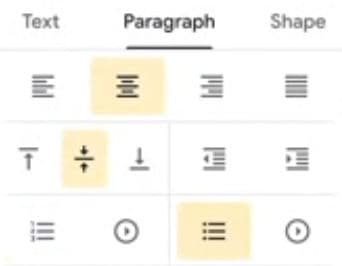
    The paragraph tab shown here is set up to align in the center of the text box both horizontally and vertically and to have bullet points.
    Question Image
    true
    false
    True or False
    30s
  • Q11

    How many words should you limit yourself to in a presentation?

    10 or more

    10 or fewer

    One or two paragraphs

    1-2

    30s
  • Q12

    Use this icon to paste images or objects in your slide.

    Answer Image
    Answer Image
    Answer Image
    Answer Image
    30s
  • Q13

    What are speaker notes?

    Text sent by email from your presentation to the audience after you present.

    Notes that you can add to your slide deck. They are hidden from the audience so only you can see them.

    Text added to slides that the audience can see when you present.

    Automatic transcripts of your live presentation.

    30s
  • Q14

    How do you add speaker notes to your Slides?

    By clicking the "more" icon: three horizontal dots.

    By clicking the "even more" icon: three vertical dots.

    You can't use speaker notes on an iPad.

    By typing them into the slide itself.

    30s
  • Q15

    How do you present on Airplay with the Speaker Notes showing just for you?

    Connect to Airplay and click the Present button. Choose "external display." 

    Connect to Airplay. They will see your notes, but don't worry about that.

    Connect to Airplay. It's automatic.

    Connect to Airplay. Resize your screen on the tv so they cannot see your Speaker notes.

    30s

Teachers give this quiz to your class
