Loading...


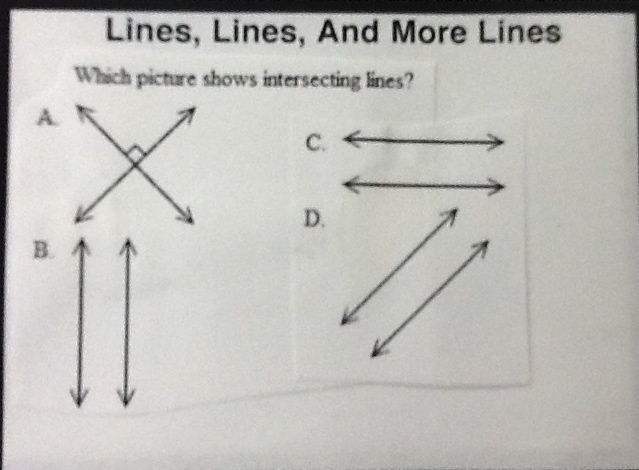
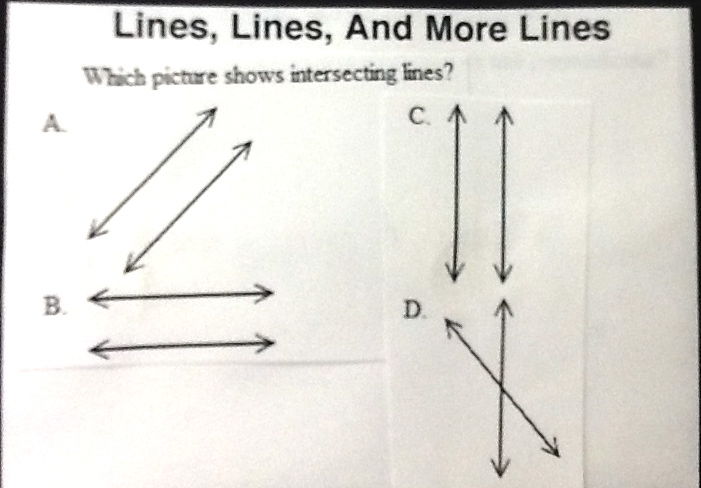
Lines, Lines & More Lines 3
Quiz by TheNorth Remembers
Customize this quiz to suit your class
Instantly translate to 100+ languages
Tag the questions with any skills you have. Your dashboard will track each student's mastery of each skill.
Give this quiz to my class


 In this video we take a look at the 0:02 fetch to code 0:03 execute cycle including its effect on 0:06 the various registers we've previously 0:12 [Music] 0:14 discussed a computer is defined Definition 0:17 as an electronic device that takes an 0:20 input 0:22 processes data 0:25 and delivers output 0:29 in this simple example you can see we're 0:31 taking the input 5 0:35 we're multiplying it by 2 that's our 0:37 process 0:39 and we're outputting 10. 0:44 but this could be way more complex for 0:46 example of a game console 0:48 the input could be the buttons you press 0:50 on a controller 0:53 the processes would then be carried out 0:55 by the console itself 0:59 and the output would be some form of 1:01 update to a monitor 1:02 and sound out for a speaker possibly 1:04 vibration feedback through the 1:06 controller 1:10 to process data a computer follows a set 1:13 of instructions 1:14 known as a computer program 1:18 if we take the lid off a typical desktop 1:20 computer we can identify 1:22 two critical components the memory 1:26 that stores the program and the central 1:29 processing unit or processor 1:31 which is under this large fan and 1:33 carries out the instructions 1:37 a computer carries out its function by 1:40 fetching 1:41 instructions decoding them and then 1:43 executing them 1:44 in a continuous repetitive cycle 1:46 billions of times a second 1:48 let's look at each of these stages in a 1:50 little more detail Fetch 1:53 so let's start with the fetch stage the 1:55 very first thing that happens 1:57 is the program counter is checked as it 2:00 holds the address 2:01 of the next instruction to be executed 2:07 the address stored is then copied into 2:09 the memory address register 2:14 the address is then sent along the 2:16 address bus to main memory 2:18 where it waits to receive a signal from 2:21 the control 2:22 bus so it knows what to do 2:27 as we want to read the data that's 2:29 stored in memory address 2:30 0 0 0 0 the control unit sends 2:34 a read signal along the control bus to 2:36 main memory 2:41 now main memory knows the data needs to 2:44 be read 2:45 the content stored in memory address 000 2:49 can be sent along the data bus to the 2:51 memory data register 2:56 now as we're currently in the process of 2:58 fetching an instruction 3:00 the data received by the memory data 3:03 register gets copied 3:04 into the current instruction register 3:11 the instruction effectively has now been 3:14 fetched from memory 3:16 just before we proceed to the decode 3:18 phase we now 3:19 increment the program counter so that 3:22 the address it contains 3:24 points to the address of the next 3:26 instruction which will need to be 3:30 executed 3:32 the instruction now being held in the 3:33 current instruction register 3:35 is ready to be decoded 3:39 now as we mentioned in the previous 3:41 video the instruction is made up of two 3:43 parts 3:44 we have the op code that's what it is we 3:47 need to do 3:50 and we have the operand what are we 3:53 going to do it to 3:55 now the operand could contain the actual 3:57 data 3:58 or indeed it could contain an address of 4:01 where the data is to be found 4:06 by decoding this instruction we can see 4:08 the operation we need 4:10 is a load operation so we need to load 4:14 the contents of memory location0101 4:18 into the cpus accumulator 4:25 in the exam a simple model will be used 4:27 to describe the 4:29 structure of any given instruction 4:32 you're not going to be expected to 4:34 define how an opcode is made up 4:36 but simply to interpret opcodes in the 4:39 given context of an exam 4:40 question in the example here 4:44 you can see there's a total of 16 4:46 different opcodes available 4:48 and this is because we're using four 4:50 bits for our representation 4:56 so now we've fetched the instruction and 4:59 we've decoded it so we know what we need 5:00 to do 5:01 we're finally ready to execute it 5:05 so we now send address 0101 5:08 to the memory dress register 5:13 now we're in the memory address register 5:15 we can finally send the address 5:18 down the address bus to main memory 5:24 this time we want to read the data 5:26 that's stored in memory 5:28 and so the control unit again sends a 5:30 read signal along the control bus 5:36 so main memories now receive an address 5:38 and a read signal 5:40 so the content stored at memory location 5:43 0101 5:44 can now be sent along the data bus back 5:46 to the cpu 5:47 and into the memory data register 5:54 finally the contents of the memory data 5:56 register are copied to the accumulator 5:59 and this is one of a number of general 6:00 purpose registers found in the cpu 6:04 this first instruction is now complete Branching 6:11 so what does this program actually do 6:14 you should be able to work it through 6:16 carefully and figure it out 6:19 we're now pointing instructions zero 6:21 zero zero one in the program counter 6:23 and we're ready to fetch the second 6:25 instruction 6:27 at the end of this video we're gonna 6:29 provide you with the answer 6:34 so let's talk a second about programs 6:37 that branch 6:40 on the left here we have a very simple 6:42 piece of pseudo code 6:44 line zero says first execute this line 6:46 of code 6:47 line 1 now execute this line and then 6:50 line 2 says 6:52 if the age is greater than 18 then 6:56 we're going to execute lines 3 and 4 6:58 otherwise 6:59 we're going to execute lines six and 7:02 seven 7:03 so this program doesn't necessarily 7:05 follow strictly in sequence from line 7:07 zero through to seven there's a chance 7:10 here the program may branch and jump 7:14 around 7:16 so we're going to pretend that this 7:17 program has been loaded into memory 7:20 each line of code on the left here has 7:23 ended up 7:24 as a location in memory now this is not 7:27 strictly how this would happen in this 7:28 one-to-one way 7:29 but for the purpose of example it's 7:31 absolutely fine 7:35 so the program counter starts by 7:37 pointing to memory address zero 7:39 and we fetch the first instruction 7:41 decode it and execute it 7:44 it then updates and tells us the next 7:47 instruction 7:48 is zero zero zero one because remember 7:50 the program counter is being incremented 7:52 so we fetch it decode it and we execute 7:55 line one of our program 7:59 we then fetch line two which in binary 8:01 is one 8:02 zero 8:06 now at this point depending on what 8:10 happens during the execution 8:11 of line two the program may be required 8:15 to fetch line three from memory or 8:18 line five from memory 8:25 so let's look at how this actually works 8:27 because we've said the program counter 8:28 simply gets incremented 8:31 well in the current instruction register 8:33 we have an instruction with the op code 8:36 0 1 1 0. 8:41 now when we look this up in the decode 8:43 unit we discover that this 8:45 code means branch always 8:51 this replaces the value held in the 8:54 program counter 8:56 with the contents of the operand that's 8:58 the second part of the instruction 9:01 from the current instruction register so 9:03 this case 9:04 one zero zero one 9:09 now when the next fetch cycle begins the 9:12 program counter is obviously checked 9:14 and as its contents have been previously 9:16 updated to a new memory location 9:19 and not simply incremented the program 9:22 effectively is able to jump 9:24 around memory 9:28 so having watched this video you should 9:30 be able to answer the following key 9:32 question 9:33 how does a cpu work 9:39 okay so let's um answer the question we 9:41 posed 9:42 earlier what did that program actually 9:48 do 9:50 so this is the first fetch to code 9:53 execute cycle 9:55 and this is the one that we ran through 9:57 in detail earlier 9:58 it effectively loaded the contents of 10:01 the memory 10:02 stored at location location0101 10:05 into the accumulator in other words 10:08 the dna number 3 is moved 10:11 from memory into the cpu 10:18 we then proceed onto the second fetch 10:20 decode execute cycle 10:23 now this one adds the contents of memory 10:27 located at 0 1 1 0 10:30 to the current contents of the 10:32 accumulator 10:34 so in other words the dna number one 10:38 because that's what's stored at address 10:40 zero one one zero 10:43 is added to the number three that was in 10:45 the accumulator 10:46 the results are stored back over the 10:48 accumulator 10:49 so effectively we've done three plus one 10:53 equals four 10:58 the third fetch to code execute cycle 11:00 stores the contents which are in the 11:02 accumulator 11:03 into memory location zero one one one 11:07 and that's because the op code the first 11:09 part of this current instruction 11:10 zero zero one one is the command to 11:13 store when we look it up in the decoder 11:15 unit 11:16 so in other words the result of the 11:17 previous calculation three plus one 11:19 equals four 11:20 is now written back into main memory 11:28 the fourth fetch decode execute cycle 11:30 outputs the contents of the accumulator 11:33 remember they were copied into main 11:34 memory but they're still held in the 11:35 accumulator 11:37 so in this simple abstraction the number 11:40 four is now 11:41 output to the user so they can see the 11:43 result of the calculation 11:49 the fifth and final fetch code execute 11:51 cycle 11:52 brings a halt to the current program 11:58 so this very simple program which has 12:01 five 12:02 fetch decode execute cycles has 12:04 performed the calculation 12:06 three plus one is then stored the result 12:09 in main memory 12:10 and displayed the result four to the 12:12 user 12:13 and in a high-level language this may 12:15 look something very similar to the 12:17 following two lines of code 12:20 sum variable equals num1 plus num2 12:24 print sum to the user 12:27 so you can start to get an appreciation 12:29 here of how the high level code you 12:32 write actually ends up being fetched 12:34 decoded 12:35 and executed inside a processor 12:38 of course your processor is doing 12:40 billions and billions of these 12:42 operations a second 12:43 which when you think about it is really 12:45 very impressive 12:52 [Music] 13:03 you. make 10 questions for a standerd of a levelAbstract An abbreviated synopsis of a longer work of scholarship or research 2. Active Voice A verb is in the ____ ____ when it expresses an action performed by its subject. 3. Adage A saying or proverb containing a truth based on experience and often couched in metaphorical language 4. Allegory A story in which the narrative or characters carry an underlying symbolic, metaphorical, or possibly and ethical meaning 5. Alliteration A repetition of one or more initial consonants in a group of words or lines of poetry or prose 6. Allusion A reference to a person, place, or event meant to create an effect or enhance the meaning of an idea. 7. Ambiguity A vagueness of meaning: a conscious lack of clarity meant to evoke multiple meanings and interpretation 8. Anachronism A person, scene, or event, or other element in literature that fails to correspond with the time or era in which the work is set 9. Analogy A comparison that points out similarities between two dissimilar things 10. Annotation A brief explanation, summary, or evaluation of text or work of literatureClassic A highly regarded work of literature or other art form that has withstood the test of time 32. Classical, Classicism Deriving from the orderly qualities of ancient Greek and Roman culture; implies formality, objectivity, simplicity, and restraint 33. Climax The high point, or turning point, of a story or play 34. Coming-of-age story / novel A tale in which a young protagonist experiences an introduction to adulthood. The character may develop understanding via disillusionment, education, does of reality, or any other experiences that alter his or her emotional or intellectual maturity 35. Conceit A witty or ingenious thought; a diverting or highly fanciful idea, often stated in figurative language 36. Connotation The suggested or implied meaning of a word or phrase. Contrast with denotation 37. Consonance The repetition of two or more consonant sounds in a group of words or a line of poetry 38. Couplet A pair of rhyming lines in a poem Denotation The dictionary definition of a word. Contrast with connotation 40. Denouement The resolution that occurs at the end of a play or work of fiction 41. Deus Ex Machina In literature, the use of an artificial device or gimmick to solve a problem 42. Diction The choice of words in oral and written discourseJAKARTA, Indonesia (AP) — Indonesia’s highest volcano on its most densely populated island released searing gas clouds and rivers of lava Sunday in its latest eruption. Monsoon rains eroded and finally collapsed the lava dome atop 3,676-meter (12,060-foot) Mount Semeru, causing the eruption, according to National Disaster Management Agency spokesperson Abdul Muhari. Several villages were blanketed with falling ash, blocking out the sun, but no casualties have been reported. Several hundred residents, their faces smeared with volcanic dust and rain, fled to temporary shelters or left for other safe areas. Thick columns of ash were blasted more than 1,500 meters (nearly 5,000 feet) into the sky while searing gas and lava flowed down Semeru’s slopes toward a nearby river. Increased activities of the volcano on Sunday afternoon prompted authorities to widen the danger zone to 8 kilometers (5 miles) from the crater, said Hendra Gunawan, who heads the Volcanology and Geological Hazard Mitigation Center. He said scientists raised the volcano’s alert level to the highest and people were advised to keep off the southeastern sector along the Besuk Kobokan River, which is in the path of the lava flow. Semeru’s last major eruption was in December last year, when it blew up with fury that left 51 people dead in villages that were buried in layers of mud. Several hundred others suffered serious burns and the eruption forced the evacuation of more than 10,000 people. The government moved about 2,970 houses out of the danger zone. Semeru, also known as Mahameru, has erupted numerous times in the past 200 years. Still, as is the case with many of the 129 active volcanoes in Indonesia, tens of thousands of people continue to live on its fertile slopes. Indonesia, an archipelago of more than 270 million people, sits along the Pacific “Ring of Fire,” a horseshoe-shaped series of fault lines, and is prone to earthquakes and volcanic activity.Filmic Techniques Based on the work of Brad Smilanich Mis-en-Scene: originally a French theatrical term arrangements of all the visual elements of the stage area in film – “the contents of the frame and the way those contents are organized” include: lighting, costume, décor, props, camera movement or distance . . . all photographic decisions etc. Proxemics: Spatial relationship among characters within the mis-en-scene Rule of Thirds: a compositional rule of thumb in painting, design, photography etc. suggests image divided into 9 equal parts with two vertical and two horizontal lines important elements of the mis-en-scene should be placed along these lines and their intersections some suggest aligning with intersections makes for more interesting pictures than just centreing the subject Proxemics Camera Distance: Quite literally, how far the camera is from the subject being filmed The Hand Camera Camera Distance: Quite literally, how far the camera is from the subject being filmed Extreme Close Up: Singles out one small portion of the body or object Used to intensify emotion, or show reaction Camera Distance: Close up Shot: Shows head of character or small significant object Used to show emotions Camera Distance: Medium Shot: shows figures from the waist up allows character to be seen within background Camera Distance: Long Shot: shows figures from feet up similar to the “stage” in live theatre orients audience to figures within a location or surrounding Camera Distance: Extreme Long Shot: Sometimes called an ‘establishing shot’ Panoramic view of an exterior location orients audience to a location Camera Distance: Camera Angle: Camera’s angle of view relative to the subject being photographed High Angle Shot: looks down on the subject often used to make the subject look small and insignificant (in combination with camera distance) puts the camera (audience) in ‘power’ position Camera Angle: Low Angle Shot: looks up at the subject often used to make the subject look large and powerful puts the camera (audience) in a ‘submissive’ position Camera Angle: Flat Angle Shot: camera on same plane as the subject feels most ‘normal’ to an audience Camera Angle: Canted Shot: frame is unbalanced in relation to the subject may indicate a symbolic unbalance in the character Camera Angle: Camera Movement literally the camera moving with or around or to follow the subjects in the mis-en-scene or frame Camera Movement: Tilting Movement camera moves up or down on a horizontal axis similar to head nodding movement may be used to show subjects relation to surroundings Camera Movement: Panning Movement camera moves side to side on a vertical axis similar to head shaking movement may be used to establish setting Camera Movement: Dolly Movement camera mounted on a vehicle that moves along with the subject (camera moves, not pivots) follows the subject to signify something important Camera Movement: Crane Shot camera mounted on a crane or boom permits camera to move in & out, up & down, backward & forward often used for high aerial establishing shots Misc. Shots: Hand Held: camera carried to seem jerky, giving ‘realistic feel’ Push In: camera moves up to a character’s face to indicate an epiphany (realization) Spiral: camera circles subject for effect End for ELA 20-2 and 10-1 Shot Transitions/Editing: artificial editing done to string together multiple shots to create a narrative scene or sequence a cut is the change from one shot to another usually separated in to ‘soft’ and ‘hard’ cuts Jump Cut: an instantaneous change from one shot to another this can be very natural or may disorient the audience, depending on how it is used Transitions/Editing Swish Pan: A pan where the speed of the camera is so fast that images are blurry used often to connect events in different settings that are connected by time Transitions/Editing Dissolve: transition where one shot gradually dissapears while another shot gradually appears often used to suggest change of setting or long time passage i.e. flashbacks Transitions/Editing Fade In/Out: transition where the shot gradually overexposes to white or underexposes to black often used to suggest a lengthy passage of time or change in location Transitions/Editing Wipe: transition where one shot is gradually eliminated as another shot moves onto the screen can be vertically or horizontally often suggests movement of the camera to another location Transitions/Editing Iris In/Out: transition where one shot gradually appears as an expanding circle in the middle of an old image suggests . . .??? Transitions/Editing Shot-Reverse Shot: one character is shown looking (often off-screen) at another character, and then the other character is shown looking "back" at the first character. Since the characters are shown facing in opposite directions, the viewer unconciously assumes that they are looking at each other. Transitions/Editing Two-Shot: Face-up shot of two people. Often used in interviews, or when two presenters are hosting a show. A "One-Shot" could be a mid-shot of either of these subjects. A "Three-Shot", unsurprisingly, contains three people. Transitions/Editing Shot Transitions/Editing: Sound: used to reflect or enhance what is shown visually on the screen can include dialogue, music, sound effects, voiceover etc. Diegetic Sound: sound that has a source in the world of the story dialogue spoken by characters, sound made by objects, or music coming from a source grounded in the story of the film Non-diegetic Sound: sound that has a source outside the world of the story usually part of the score or the soundtrack Parallel Sound: sound that complements the image shown i.e. romantic music during a love scene Counterpoint Sound: sound that contradicts the ‘feeling’ of the image a happy song played while images of graphic violence are portrayed Voiceover: voice of a non-visible narrator laid over the scene often provides some comment about the narrative of the film Sound Bridge: used to ‘soften’ the transition between one scene and another takes sound from the next shot and overlays it on the current shot 2-3 seconds earlier than we see the image Examples of Diegetic/Non-Diegetic: In the first clip, the non-diegetic music changes to diegetic music when the main character moves inside of the convenience store. In the second clip, the “duhn duhn duuuuh” which often is non-diegetic becomes diegetic because it is the band in the passing bus playing that music! End for ELA 20-1 Lighting: Can be used by a director to: Control the mood of a scene guide a viewer’s eye to a specific place in mis-en-scene Emphasize and de-emphasize elements in frame Add texture and color Make people look beautiful, ugly, sinister, or angelic Standard 3-Point Lighting: uses three lights called the key light, fill light and back light forms the basis of most lighting. once you understand three point lighting you are well on the way to understanding all lighting. Key Light: main light usually the strongest and has the most influence on the look of the scene. it is placed to one side of the camera/subject so that side is well lit and other side has shadow. Fill Light: secondary light is placed on the opposite side of the key light used to fill the shadows created by key softer and less bright than key Back Light: placed behind the subject ; lights it from the rear. provides definition and subtle highlights around the subject's outlines. Separates subject from background provides a three-dimensional look. Standard 3-Point Lighting: http://www.zvork.fr/vls/ Try using this simulator to play with lighting with those 3 points.Create a quiz with the following questions and answersConvection is… The rising motion of warm air A large volume of air A boundary between two different air masses The weight of the Earth’s atmosphere over an area What are isobars? Storms with strong winds, heavy rains, lightning, and thunder Lines on a map to show high and low pressure The study of elevation This front is associated with thunderstorms, heavy rain, snow, and cooler temperatures. Warm front Stationary front Cold front Occluded front What is a barometer? A tool used to measure temperature An instrument used to measure wind speed An instrument used to measure humidity An instrument used to measure air pressure What is a tornado? Storms with strong winds, heavy rains, lightning, and thunder Large, rotating tropical weather systems A rapidly spinning column of air that has touched the ground What is topography? The study of elevation Lines on a map to show high and low pressure The condition of the atmosphere at a given place and time What are air masses? Large, rotating tropical weather systems The study of elevation A large volume of air with the same temperature What is transpiration? The process of a liquid’s surface changing into a gas The process of a gas changing into a liquid The movement of water through the soil The process of water vapor being released by plants. What is nitrification? The process bacteria use to convert nitrogen gas into ammonium ions The process of turning ammonium ions into nitrites and nitrates. The uptake of nitrates in the soil by the roots of plants. The process of turning nitrates into nitrogen gas Fun Fact: Carbon makes up ___ of your mass. 30% 18% 50% 6% What are the reactants of photosynthesis? Carbon dioxide and water Glucose and oxygen What are the reactants of cellular respiration? Carbon dioxide and water Glucose and oxygen What is a storm surge? Flooding caused by hurricanes Region of air where the air pressure is low Any product of the condensation of water vapor High pressure is… A region of air where the air pressure is greater than that of the surrounding area A region of air where the air pressure is lower than that of the surrounding area. Low pressure is… A region of air where the air pressure is greater than that of the surrounding area A region of air where the air pressure is lower than that of the surrounding area. What causes global winds? Photosynthesis The process carbon goes through Uneven heating of the Earth What can humans do to reduce carbon emissions? We can use renewable energy (ex. solar power) We can use non-renewable energy (ex. fossil fuels) Carbon can form stable bonds with many elements and and makes up the backbone of major macromolecules: carbohydrates, proteins, lipids, and ___ Nucliec acids Glucose Oxygen Nitrogen What weather is associated with low-pressure systems? Bad weather (ex. Cloudy weather) Good weather (ex. Sunny weather) What is fossilization? The burning of fossil fuels The process where fungi and bacteria decompose dead organisms Dead organisms form fossil fuels over thousands and millions of years What is the first step in the formation of tornadoes? Rising air from the ground pushes up on the swirling air and tips it over A large thunderstorm occurs in a cumulonimbus cloud The funnel grows longer and stretches towards the ground The funnel of swirling air begins to suck up more warm air from the ground What is the difference between thunderstorms and regular storms? Thunderstorms have thunder while regular storms don’t Regular storms have thunder while thunderstorms don’t There is no difference What are hurricanes? Rapidly spinning columns of air touch the ground Large, rotating tropical weather systems Storms with strong winds, heavy rains, lightning, and thunderstorms What is not a hurricane fact? They are the most powerful storms on earth They have an average wind speed of 120-180 km/h They lose their power when they travel over cooler waters or land Storm surges cause the most damages What is the difference between weather and climate? Weather is long-term while climate is short-term Climate is long-term while weather is short-term There is no difference Certainly, let's expand on each section in detail so you can learn more from the provided text: # Summary This text aims to explain various aspects related to technology, particularly focusing on a concept known as "Tech Disruption." It explores how technology affects different sectors, outlines the conditions for tech disruption, discusses the industrial revolutions, introduces the laws of disruption, and mentions factors influencing technology choices. ## Concept of Technology **Technology** encompasses a range of elements within organizations. It includes **expertise, equipment, and procedures** used to convert inputs, such as resources or raw materials, into outputs, which can be products or services. This involves various aspects, such as **product design, production techniques, quality assurance measures, human resource development, and management systems**. In essence, technology represents the tools and knowledge used to create and deliver goods or services effectively. ## What is Tech Disruption **Tech Disruption** refers to a phenomenon where smaller companies with limited resources successfully challenge well-established incumbent businesses. This disruption is primarily driven by **technology**, which acts as the catalyst, enabler, or even the sole reason behind the change. The significance of this concept lies in the fact that entrepreneurs must make careful and thoughtful decisions when it comes to adopting and investing in technology. **Why it's Important?** These decisions are crucial because they involve significant investments and will have a substantial impact on a company's ability to create, innovate, and operate its services in a sustainable and cost-effective manner. ## Four Main Impact **Tech Disruption** has four main impacts on businesses and industries: 1. **Shifting Customer Expectations**: As technology evolves, customer expectations change. Companies must adapt to meet these evolving demands to remain competitive. 2. **Enhanced Products Through Data**: Data-driven insights improve the productivity and efficiency of assets, leading to better products and services. 3. **New Partnerships and Collaboration**: Tech disruption encourages companies to form new partnerships and collaborations, recognizing the importance of working together to stay relevant. 4. **Transformation of Operating Models**: Traditional operating models are being transformed into digital models, where technology plays a central role in how businesses operate and deliver value. ## The 11 Macro Sources of Distribution The **11 Macro Sources of Distribution** represent various factors that influence the distribution of resources and opportunities in society. These factors include: 1. **Wealth Distribution**: How wealth is distributed among individuals and entities. 2. **Education**: The availability and quality of education opportunities. 3. **Infrastructure**: The state of infrastructure, such as transportation and communication networks. 4. **Government**: Government policies and regulations that impact resource distribution. 5. **Geopolitics**: Geopolitical factors, such as international relations and conflicts. 6. **Economy**: Economic conditions and trends, including markets and financial systems. 7. **Public Health**: The state of healthcare and public health systems. 8. **Demographics**: Characteristics of the population, such as age and gender. 9. **Environment**: Environmental factors and sustainability concerns. 10. **Media and Telecommunications**: The role of media and communication technologies. 11. **Technology**: Technological advancements and their impact on society. ## When Does Tech Disruption Happen? **Tech Disruption** occurs when specific conditions are met: ### Technology Is Mature Enough - **Technology Accessibility**: Technology must be accessible to a wide range of people and organizations. - **Critical Mass**: It should have reached a critical mass where it can create significant impact. - **Affordability**: Technology must be affordable for businesses to adopt. ### Sector Is Ready For Change - **Tech Infrastructure**: The sector should have the necessary technological infrastructure in place. - **Policy Framework**: A conducive policy framework is essential to support and regulate the use of technology. - **Lack of Disruption**: If the sector is stagnant or facing issues, it becomes ripe for tech disruption. ### Sector + Technology + Timing + Product - **Mature Technology with an Unready Sector**: If technology is mature but the sector is not ready, it can lead to building the wrong product based on incorrect assumptions. - **Unmatured Technology with a Ready Sector**: Conversely, if technology is not matured but the sector is ready, it may take longer to develop the product. ## Ready for Industri 5.0? This section briefly outlines the five industrial revolutions: 1. **Industri 1.0 (1784)**: Marked by mass production assembly lines using electrical power. 2. **Industri 2.0 (1870)**: Introduced mechanization, steam, and water power. 3. **Industri 3.0 (1969)**: Characterized by automated production, computers, IT systems, and robotics. 4. **Industri 4.0 (Present)**: Involves smart factories, autonomous systems, IoT (Internet of Things), and machine learning. 5. **Industri 5.0 (Future)**: Envisions mass customization and cyber-physical cognitive systems. ## Three Laws of Disruption These laws explain the nature of disruption: 1. **Disruption Comes to All**: Disruption is a universal phenomenon; it affects all industries and businesses sooner or later. 2. **Product-Market Fit**: Disruption occurs due to changes in Product-Market Fit, which means aligning a product with its target market effectively. 3. **Methods to Change Product-Market Fit**: To address disruption, a company can change the product, the target market, or influence people's preferences regarding the product. ## The 40% Rule This rule provides a framework for evaluating the fit between a product and its market: - **Value Proposition**: The product should solve customers' problems effectively. - **Channels**: The product should be able to reach customers cost-effectively. - **Monetization**: Customers should be willing to pay for the product. ## PMF Framework: 5 Steps to Product/Market Fit The **PMF (Product/Market Fit) Framework** consists of five steps: 1. **Business Modeling**: Developing a business model that aligns with the market. 2. **Market Validation**: Confirming that there is demand for the product in the market. 3. **Customer Interviews**: Gaining insights from potential customers. 4. **Product Development and Customer Acquisition**: Creating the product and acquiring customers. 5. **Product Analytics**: Using data to determine if the product has achieved Product/Market Fit. ## Factors Determining the Choice of Technology Several factors influence the choice of technology: 1. **Government Policy**: Government regulations and policies can encourage or restrict the adoption of specific technologies. 2. **Available Resources**: The resources, both financial and human, impact the adoption of technology. 3. **Technological Capability**: The organization's technological capabilities influence the choice of technology. 4. **Existing Technological Level**: The current technological state of the industry or organization plays a role. 5. **Institutional Arrangement**: Organizational structures and arrangements affect technology choices. ## Conclusion In conclusion, the text emphasizes the critical role of technology in driving change and disruption in various industries. It highlights the need for informed decision-making when it comes to technology investments, as well as the conditions necessary for tech disruption to occur. Understanding the historical context of industrial revolutions, the laws of disruption, and the factors influencing technology choices is essential in today's fast-paced and tech-driven business environment. Embracing technology disruption is crucial for transforming business models and adapting to evolving market dynamics.Rotations In a doubles game, the players have to take turns hitting the ball with their partner. After each shot, a player has to move out so that the partner can get into the best position for the next shot. It is very important that both players establish an effective rotation pattern and alternative rotation patterns. 1. Circular Rotations (Figure 16.1) Each player moves in a circular way behind the partner after each shot and should be ready to move up and hit. Both players move the same way and two left-handed or right-handed aggressive players can use this movement. 125 16.1 circular rotations 2. Up and Down Rotations (Figure 16.2) Each player moves toward table in a diagonal way to return a shot then back up the same way. One left-handed and one right-handed pair use this rotation. 16.2 up and down rotations 3. T-Rotations (Figure 16.3) The front person moves sideways and the back person moves back and forth. Mostly pairs of one fast style player (front) and one loop style player (back), or one close-table offensive player (front) and one slice style player (back) use this rotation. 16.3 “T” rotations 4. Triangle Rotations (Figure 16.4) Each player using this rotation pattern moves to sides to return shot, then step back to the middle for the next shot in a triangle way. It is used often to return angles shots to sides and it is similar to the circular rotation. 126 16.4 triangle rotations Teamwork and Strategies 1. Establish a good rotation and movement patterns. 2. Create chances for your partner when returning a shot or serve. 3. Cover your partner's weaknesses. 4. Attack the weaker opponent. 5. Hit to the opponent who just finished the shot and is moving away. 6. Use your best serves and shots in games to ensure your best play and reduce mistakes. 7. Change serves and shots to keep opponents guessing what the next motion will be. 8. Change speed, power, lines and placement of the shots and serves to avoid opponents adapting to them. 9. Combine spin and flat serves to force opponent make more mistakes. 10. Attack opponents’ weaknesses. 11. Avoid the strength of opponent. For example, hit to the backhand if opponent is strong at forehand, or use more short chop shots if opponent is very aggressive. 12. Hit to the openings, weak side, and an opponent's body.