Loading...


Networking Tools and Cable Quiz
Quiz by April Pagsuyuin
Customize this quiz to suit your class
Instantly translate to 100+ languages
Tag the questions with any skills you have. Your dashboard will track each student's mastery of each skill.
Give this quiz to my class
It is an 8 wire connector used to connect computers to a local area network
F Connector
RJ45
RG 8
RG 58
Which among the following is the use of a wire stripper?
Use to cut the wires
Use to twist the wires
Use to cut the protective jacket of the wire
Use to untwist the wire
It is an 8 wire connector used to connect computers to a local area network
Which among the following is the use of a wire stripper?
How do we call this networking tool?

It is a devise used to test and connectivity of a particular type of cable or other wired assemblies.
How do we call this?

It is used to crimp or connect a connector to the end of a cable
It is a type of copper cable specially built with a metal shield and other components engineered to block signal interference. It is primarily used by cable TV companies to connect their satellite antenna facilities to customer homes and businesses.
This cable can deliver signals that are clearer and can go farther without compromising the clarity of signals.
A type of cable that has pairs of wire which forms a circuit that transmit data.
Name this cable
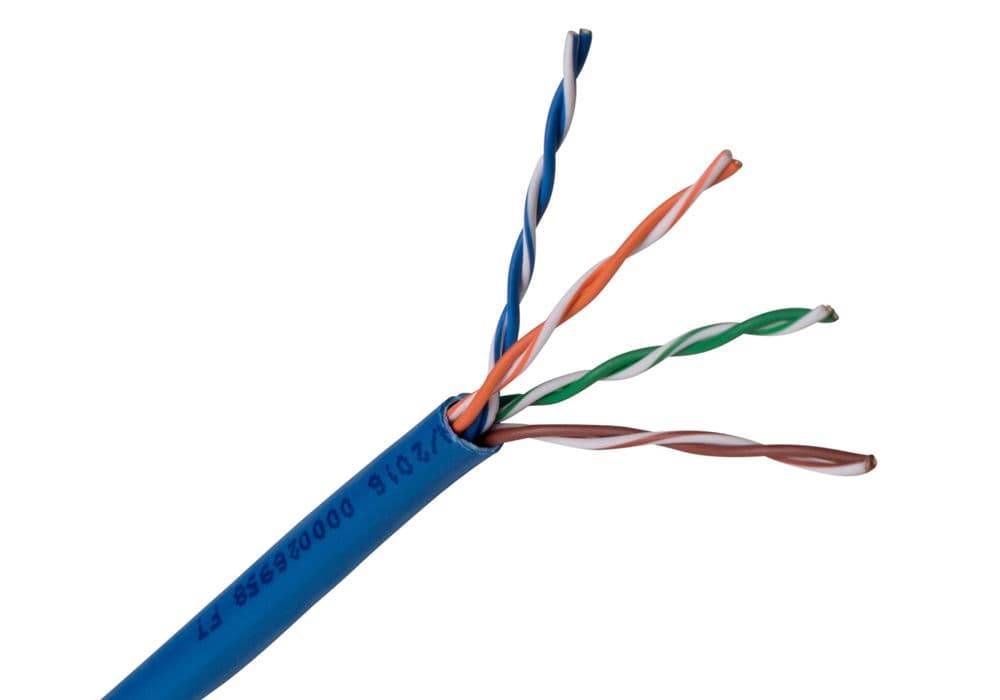
Name this cable
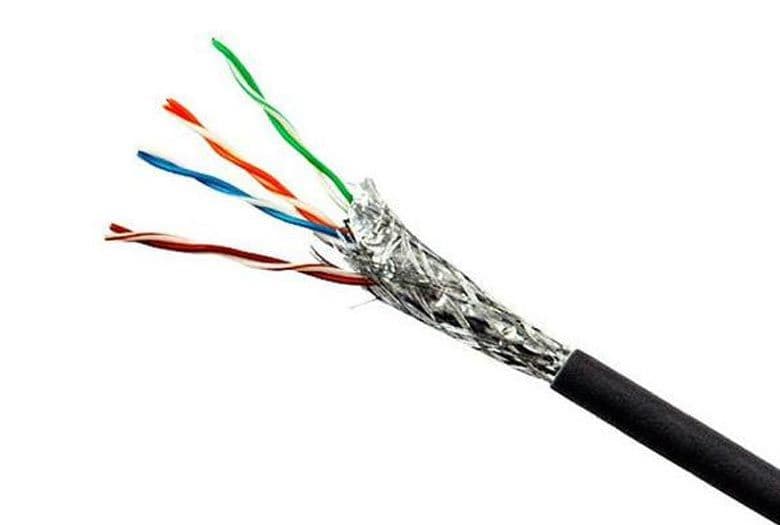
How many wires do a twisted pair cable have?
How many pairs of wires do twisted pair cable have?
These are used to connect two computers or similar devices directly together, such as computers or hubs
It is an is an ethernet cable that is used in local area network to connect computer to a network hub like router
Which cable can be uses if you are going to install a LAN network within a room?
Which cable should be used to connect a switch to another switch?
Which cable is best to be used if you are going to install a network within a building?
Which cable should be used to connect a switch to a router.
You can still removed and reuse the RJ45 after crimping it.
Networking Tools and EquipmentNETWORKING DEVICE AND TOOLSRevealing personal data can lead to threats like identity theft, fraud, bullying, and blackmail. 1.Identity Theft Definition: Identity theft occurs when someone steals your personal information and uses it without your permission. This can include your name, Social Security number, or bank details. Example: If someone gets your Social Security number, they could open a credit card in your name and run up bills that you would have to pay. 2.Fraud Definition: Fraud is when someone deceives another person to gain something of value, like money or personal information. This is often done through lies or tricks. Example: A person might call you pretending to be from your bank and tell you that you need to confirm your account details. If you give them your information, they may steal your money. 3. Bullying Definition: Bullying is when someone repeatedly hurts, threatens, or picks on another person. This can happen in person or online (cyberbullying). Example: If someone sends hurtful messages or spreads rumors about you on social media, that’s a form of bullying. 4. Blackmail Definition: Blackmail is when someone threatens to reveal harmful or embarrassing information about you unless you give them something they want, usually money or favors. Example: If someone takes a private photo of you and threatens to share it unless you pay them, that’s blackmail. Summary Identity Theft: Stealing personal information for illegal use. Fraud: Deceiving someone for personal gain. Bullying: Repeatedly hurting or threatening someone. Blackmail: Threatening to expose information unless demands are met. Understanding these terms helps you recognize and protect yourself from potential dangers in both real life and online. If you see any signs of these actions happening, it’s important to talk to a trusted adult or authority figure. There are several guidelines for you to be aware of to keep your personal data confidential: •Have strong passwords set on any account that holds personal data. Stronger passwords include characters, numbers and symbols and are not a recognisable word. •Encrypt (scramble text so that it cannot be read without a decryption key) any personal data that you store on your computer. •Have a firewall present, scanning incoming and outgoing data from your computer system. firewall : a security measure that can be implemented to monitor traffic into and out of a computer and prevent external users gaining unauthorised access to a computer system. A firewall is a security measure that helps protect a computer system by monitoring and controlling the traffic that comes into and goes out of the system. Think of it as a barrier between your computer and the outside world. It prevents unauthorized users from accessing your computer while allowing authorized traffic to pass through. •Regularly scan your computer with preventative software, such as an anti-virus package, that is used to identify a virus on a computer and remove it. Anti-virus: software that is used to identify a virus on a computer and remove it •Make use of any biometric devices (devices that measures a person's biological data, such as thumbprints), that are built into technology. biometric devices: Unique physical characteristic of a person that can be used by a computer for identification purposes. https://www.aratek.co/news/biometric-devices-definition-and-examples Biometric devices are tools that use unique physical characteristics of a person for identification purposes. This means they can recognize who you are based on features that are unique to you. Here are some examples of biometric characteristics: Fingerprint Recognition, Facial Recognition, Voice Recognition •Only visit and provide data to websites that are a trusted source. •Do not open any email attachments from a sender you do not recognise. •Check the URL attached to any link requesting data to see if it is genuine. •Be cautious about any pictures or opinions that you post or send to people. •Remove data about your location that is normally attached to your photos and videos that you may post, such as geotags. Geotag: an electronic tag that assigns a geographical location A geotag is an electronic tag that assigns a specific geographical location to a piece of information, like a photo or a video. Geotags can help people understand where a photo was taken or where an event occurred, making it easier to organize and find information based on location. •Do not become friends on social networking sites with people you do not know. •Set all the privacy controls to the most secure setting that are available on social media accounts. •Report and block any suspicious user. •Use a nickname or pseudonym when using the internet for entertainment, for example, playing games. •If it is possible, use a virtual private network (VPN), an encrypted connection that can be used to send data more securely across a network. Virtual private network (VPN) : an encrypted connection that can be used to send data more securely across a network A Virtual Private Network (VPN) is a special way to connect to the internet that keeps your information safe. Imagine you are sending a secret message to a friend. You want to make sure no one else can read it while it travels. A VPN helps you do just that! It creates an encrypted connection, which means it turns your message into a code that only your friend can understand Example: Public Wi-Fi Safety: When you use public Wi-Fi, like in a café, your data can be easily accessed by hackers. If you connect to a VPN while using that public Wi-Fi, your data is encrypted, making it much harder for anyone to steal your information. ENGLISH GROUP PROJECT: THE GLOBAL VENTURE (Thailand) Comprehensive Presentation Script & Role Outline (5-Person Distribution) 1. Strategic Role & Workload Distribution Matrix Role / Name Core Domain / Responsibility Presentation Delivery Scope Member 1Member 1 Tan Finance & Housing (Rent, cost of living, deposits, urban/rural margins)Finance & Housing (Rent, cost of living, deposits, urban/rural margins) Slide 3: Finance Lead, Slide 8: Data VisualizerSlide 3: Finance Lead, Slide 8: Data Visualizer Member 2Member 2 Huy Work Culture & Professional Etiquette (Hierarchy, industry growth, networking)Work Culture & Professional Etiquette (Hierarchy, industry growth, networking) Slide 3: Culture Lead, Slide 9: Adaptation ExpertSlide 3: Culture Lead, Slide 9: Adaptation Expert Member 3Member 3 Minh Legal, Immigration & Visa Pathways (Non-Immigrant B visas, extensions, 90-day rules)Legal, Immigration & Visa Pathways (Non-Immigrant B visas, extensions, 90-day rules) Slide 3: Legal Anchor, Slide 4: Legal FrameworkSlide 3: Legal Anchor, Slide 4: Legal Framework Member 4Member 4 THanh Healthcare Ecosystem & Public Safety (Insurance, emergency networks, local hazards)Healthcare Ecosystem & Public Safety (Insurance, emergency networks, local hazards) Slide 3: Safety Anchor, Slide 10: Matrix PresenterSlide 3: Safety Anchor, Slide 10: Matrix Presenter Member 5Member 5 Sơn(project manager),Kiên Logistics, Climate & Project Manager (Transit, weather, group synthesis)Logistics, Climate & Project Manager (Transit, weather, group synthesis) Slide 1-2: Opener, Slide 6: Email Lead, Slide 11-12: CloserSlide 1-2: Opener, Slide 6: Email Lead, Slide 11-12: Closer 3. Complete Presentation Script (Slide-by-Slide) Execution Note: During delivery, presenters should display the corresponding slide from the HTML presentation tool. Speak clearly, maintaining eye contact with the grading panel. 12-Slide Presentation Guide: Secondments in Thailand Slide 1: Title Slide Purpose: Introduce the topic clearly. Content guide: Include the presentation title, group members’ names, course/module name, and date. Speaker guide: Briefly say that the presentation explains what employees and companies should consider before sending someone on secondment to Thailand. Slide 2: Agenda / Overview Welcome everyone. Our presentation is about secondments in Thailand. We will cover the main areas that a company and employee should prepare for before relocation. These include finance and housing, work culture, legal and visa requirements, healthcare and safety, and daily logistics such as transport and climate. By the end of the presentation, we hope to show that a successful secondment depends not only on the job itself, but also on good planning before and after arrival in Thailand. Slide 3: What Is a Secondment? A secondment is a temporary work assignment where an employee is transferred to another country, branch, client site, or partner organization while usually remaining connected to the original employer. Secondments require coordination between the employee, home employer, host organization, and local authorities. Slide 4: Finance & Housing — Cost of Living Finance and housing are one of the first things a secondee should plan before moving to Thailand. The cost of living can vary a lot depending on whether the employee is based in Bangkok, another major city, or a regional area. Urban areas usually have higher rent, but they also offer better access to transport, hospitals, offices, and international services. In smaller cities or rural areas, rent may be lower, but transport and convenience can become bigger concerns. So, the key point is that secondees should not only compare prices, but also consider location, commute, and what support the employer provides. Slide 6: Work Culture — Hierarchy & Etiquette Purpose: Help secondees understand workplace expectations. Content guide: Cover respect for seniority, polite communication, indirect feedback, saving face, punctuality, proper greetings, and professional dress. Speaker guide: Explain that foreign employees should avoid being too blunt in meetings and should observe how local colleagues communicate with managers or senior staff. Suggested visual: “Do and Don’t” etiquette list. Slide 7: Work Culture — Industry Growth & Networking Purpose: Connect secondments to career and business opportunities. Content guide: Mention sectors where Thailand often attracts foreign professionals, such as manufacturing, tourism, logistics, finance, technology, and regional business operations. Discuss relationship-building and networking. Speaker guide: Emphasize that trust and long-term relationships are important in Thai professional settings. Networking can happen through industry events, chambers of commerce, company introductions, and informal business meals. Suggested visual: Thailand industry opportunity map or sector icons. Slide 8: Legal & Immigration — Visa Pathways Purpose: Explain the main legal entry pathway for work-related secondments. Content guide: Introduce the Non-Immigrant B visa as a common work/business visa category. Mention that supporting documents may include passport, application forms, employment or company letters, and other evidence requested by Thai authorities. Speaker guide: Make clear that a visa alone may not be enough to legally work; seconded employees normally need the correct visa and work authorization. The exact process depends on the employer, role, nationality, and assignment structure. Suggested visual: Simple flowchart: Home employer → Host company → Visa application → Arrival → Work permit/compliance. Slide 9: Legal & Immigration — Compliance Rules Purpose: Explain ongoing responsibilities after arrival. Content guide: Cover visa extensions, work permit validity, re-entry permits, address reporting, and 90-day reporting for eligible long-stay foreigners. Speaker guide: Stress that compliance is not a one-time task. Employees and HR teams should track deadlines carefully because missing reporting or renewal dates can cause fines, delays, or legal issues. Suggested visual: Compliance checklist or timeline. Slide 10: Healthcare & Public Safety Purpose: Explain how secondees should prepare for health and safety risks. Content guide: Cover international health insurance, access to private hospitals, emergency numbers, vaccinations or health checks if required, and common local hazards such as road safety, flooding, heat, food hygiene, and mosquito-borne illnesses. Speaker guide: Explain that Thailand has strong healthcare options in major cities, but employees should confirm insurance coverage before arrival. They should also know what to do in an emergency and save important contact numbers. Suggested visual: Emergency preparation checklist. Slide 11: Logistics & Climate Purpose: Explain practical relocation and daily-life planning. Content guide: Cover public transit, taxis, ride-hailing, domestic travel, airport access, SIM cards, banking, weather, rainy season, heat, and packing needs. Speaker guide: Mention that weather affects commuting, clothing, housing choice, and travel planning. Employees should plan around heat, rain, and possible flooding, especially during the rainy season. Suggested visual: Seasonal calendar showing hot, rainy, and cool periods. Slide 12: Project Manager / Group Synthesis Purpose: Bring the presentation together and end with key recommendations. Content guide: Summarize the main risks and preparation steps: budget early, secure compliant visa/work permit arrangements, understand workplace culture, arrange insurance, and prepare for climate/logistics. Speaker guide: Conclude by saying that a successful secondment in Thailand depends on both professional readiness and personal relocation planning. End with 3–5 recommendations for companies and employees. Suggested visual: Final checklist: “Before departure,” “Upon arrival,” and “During secondment.” A simple way to divide the work is: Member 1: Slides 1–3 introduction. Member 2: Slides 4–5 finance and housing. Member 3: Slides 6–7 work culture. Member 4: Slides 8–9 legal and immigration. Member 5: Slides 10–12 healthcare, logistics, and conclusion. Networking ToolsChatGPT Quiz: Networking Tools - HardwareNetworkingNetworking Basics Test