Loading...


VECTOR TEST
Quiz by Vaibhav Shinde
Customize this quiz to suit your class
Instantly translate to 100+ languages
Tag the questions with any skills you have. Your dashboard will track each student's mastery of each skill.
Give this quiz to my class
Q.1
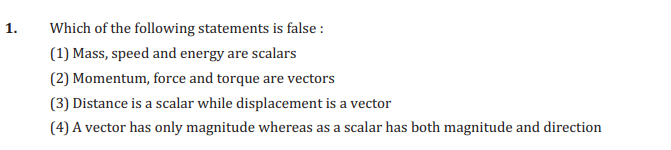
3
1
2
4
Q.2
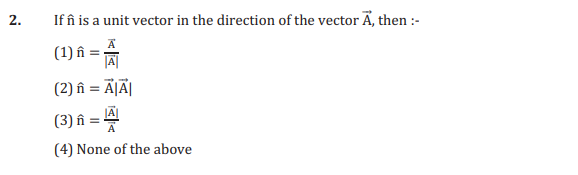
3
4
1
2
Q.1

Q.2
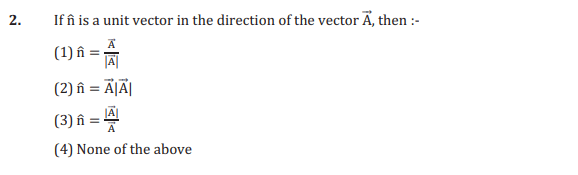
Q.3
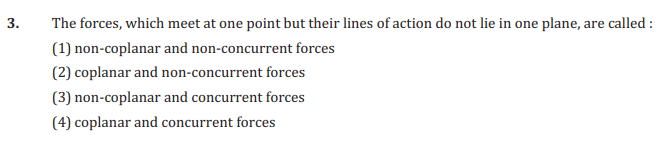
Q.4
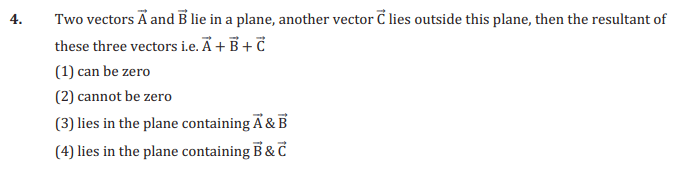
Q.5
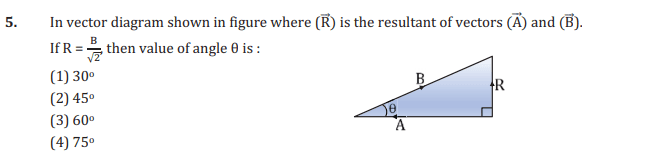
Q.6

Q.7
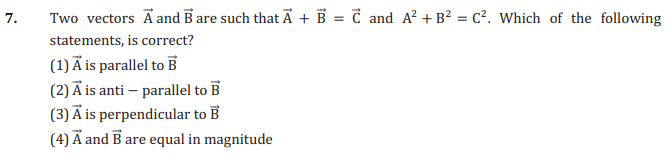
Q.8

Q.9

Q.10
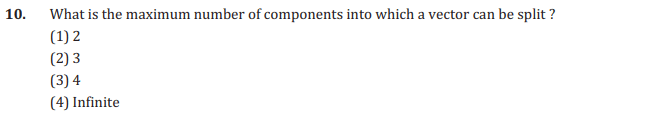
Q.11
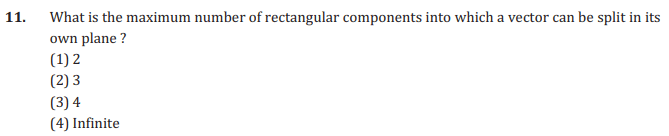
Q.12

Q.13

Q.14

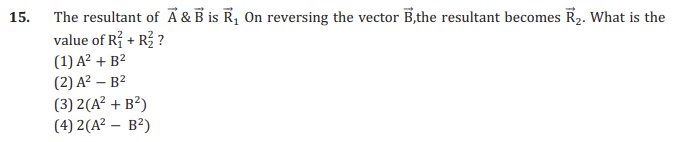
Q.15
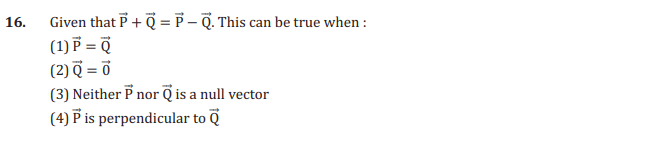
Q.16
Q.17

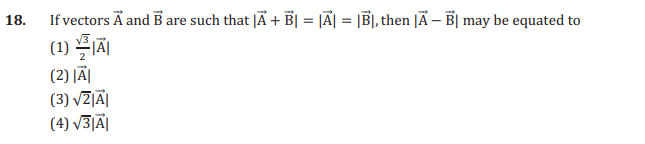
Q.18
Q.19
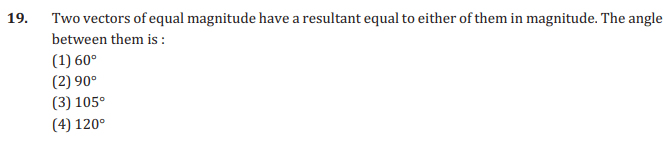
Q.20

Q.21
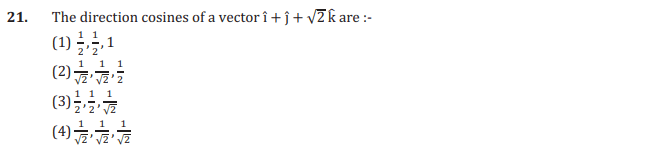
Q.22
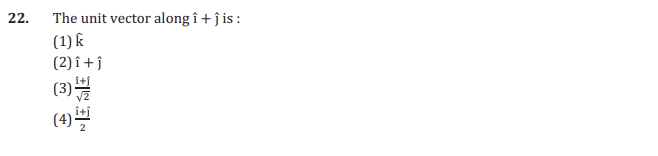
Q.23
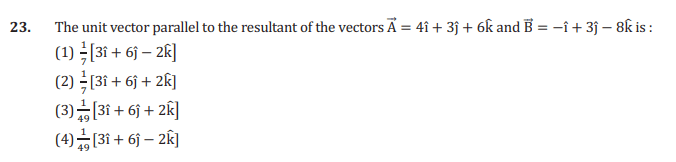
Q.24

Q.25

Q.26
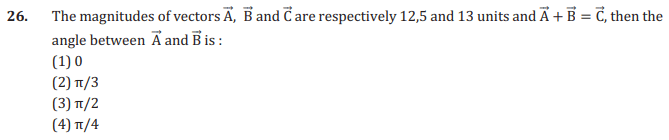
Q.27
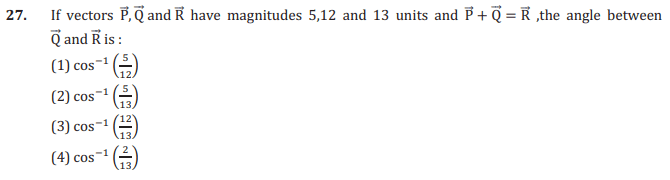
Q.28

Q.29

Q.30
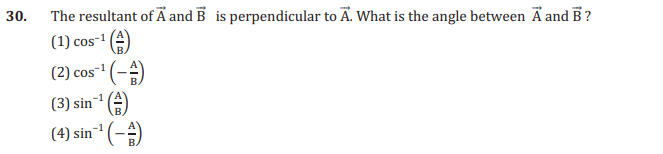
Q.31
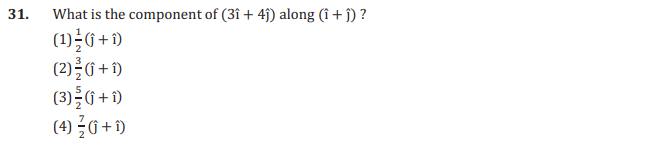
Q.32

Q.33

Q.34
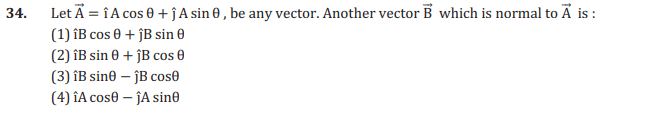
Q.35
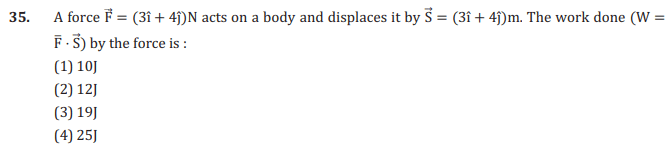
Q.36

Q.37
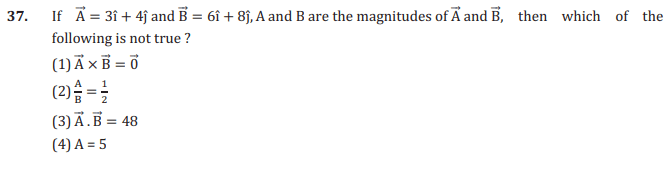
Q.38
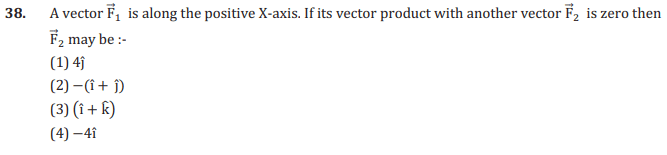
Q.39

Q.40
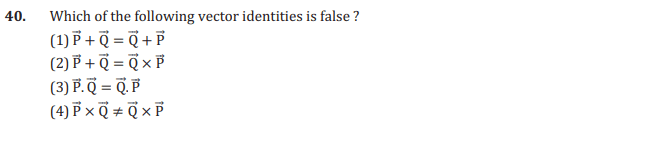
Q.41

Q.42
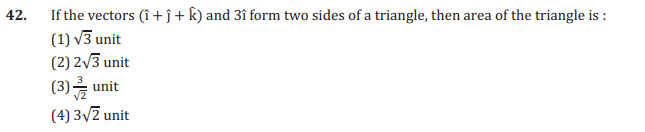
Q.43
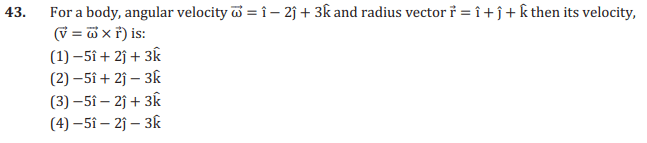
Q.44

Q.45
 Electrostatics The section of CBSE Class 12 Physics electrostatic potential and capacitance notes mainly deals with the in-depth analysis of electromagnetic phenomena when they are not performing any movements. Additionally, it is divided into ten further sub-topics to study the companion processes of reaching the state. These are - 1. Electric charge In this section of Physics ch 2 Class 12 notes, you get to learn about the basic features of electric charge and its expression in Physics. Along with its basics, the sections help to understand the full potential of charge. Different aspects of Charge included in Class 12 Physics Chapter 2 notes are - Definition Type: Positive and Negative Charge Unit and dimensional formula Point Charge Properties of Charge Comparison of Charge and Mass Methods of Charging Electroscope 2. Coulomb's Law Force is created when charges of opposite signs attract each other, and they repulse if the signs are the same. Coulomb's law tries to define this phenomenon through a mathematical formula, explicitly mentioned in Physics Class 12 notes Chapter 2. Moreover, there is key information about the variation of the constant k and its effect on a medium. Coulomb's law's vector form and the principle of superimposition are also explained in ch 2 Physics Class 12 notes. (Image will be uploaded soon) 3. Electric Field As stated in Class 12 Physics Chapter 2 notes, every positively or negatively charged particle has their respective electric fields. It feels a force at the time of interaction which might be attraction or repulsion. As it arises from electric charge, it is crucial to know about its different parts like - Electric field intensity Relation between electric force and electric field Super imposition of electric field Point charge Continuous charge distributions Properties of Electric Field Lines Motion of Charged Particles in an Electric field Learning more about the electric field from electric potential and capacitance notes Class 12 helps a student to get a grasp of upcoming chapters. 4. Electric Potential Energy When energy helps a charge to move from an electric field, it is known as the Electric Potential Energy. This section of electrostatic chapter Class 12 notes requires a student to study the Electron volt (eV), and the potential energy that an n number of charges can hold. 5. Electric Potential This section of Class 12 Physics Chapter 2 notes focuses on in-depth learning of Electric Potential or Voltage. Basically, it defines the potential movement of energy. 6. Relation between Electric Field and Potential Apart from knowing more about the relationship between the two values, Physics Class 12 Chapter 2 notes also discuss equipotential surfaces. 7. Electric Dipole Essentially, 'Dipoles' are two opposite points of charge represented with q and –q, with their distance between each other being 2a. Electric Dipoles are crucial in your study of Physics Class 12 Chapter 2 notes to learn more about electric fields and their potential. Additionally, Class 12 Physics Chapter 2 notes focus on the influence of electric dipoles on a uniform electric field mainly through Force and Torque, Work, and Potential Energy. In the last part of Electrostatics, further focus is on using the formulas to their fullest potential. It includes subsections of Electric Field, Electric Potential Energy, Electric Potential, and Electric Dipole. In the notes for electrostatic potential and capacitance, you will find proper solutions accompanied by clear and crisp diagrams for better understanding. 8. Gauss's Law Apart from just discussing the Gauss's Law, in Physics Class 12 ch 2 notes there is a thorough explanation of its properties and applications. The Gauss' Law states that net electric flux passing through a hypothetical closed surface is equal to the net electric charge present within the same closed surface. Being a broad part of the whole chapter, you may need to spend a little more time on it. Moving forward, it starts discussing the properties of conductors in relation to Gauss's Law. The Class 12 Physics notes Chapter 2 perfectly defines the journey to Gauss' Law from Coulomb's Law. Here is the Gauss's Law present in the Class 12 Physics ch 2 notes, (image will be uploaded soon) 9. Capacitors There is a dedicated section about Capacitors in the Class 12 Physics Chapter 2 notes elucidating its functions and importance as storage of potential electric energy. After explaining the structure of a capacitor, it points out the different types, parallel plate, spherical and cylindrical. The section of Chapter 2 notes of Physics Class 12 is further divided into subheads like: Properties of an ideal battery Grouping of capacitors Simple circuits (Series and Parallel) Dielectric Van de Graaff generator Combination of drops Charge distribution method Wheatstone Bridge-based circuit Extended Wheatstone Bridge Infinite network of capacitors Redistribution of charge between two capacitors Vedantu prepares the Class 12 Physics Chapter 2 notes with help from subject matter experts. In the PDF, you get a comprehensive idea of the topic along with potential answers to the most asked questions. Furthermore, the detailed explanation on each section and subsections are written in a simple language allows a student to ace their exams with wholesome knowledge. These Physics Chapter 2 Class 12 notes are going to be one of the best supplementary study materials besides a student’s textbooks. Visit the Vedantu website or download the app to get your hands on all important notes! Important Questions A charge of 4 × 10⁻⁸C is uniformly distributed on the surface of a spherical conductor, having a radius of 15 cm. Determine the electric field just outside this sphere at a point that is 15 cm from the centre of this sphere. Determine the capacitance given that the distance between the two plates has been reduced by half and the parallel plate capacitor holds a capacitance of 20 pF (where 1pF = 10-12 F) having air between the two plates. What will be the total capacitance of a combination where three capacitors, each having a capacitance of 20 pF, are connected in series. A square having a side of 10 cm has a 500 µC charge at its centre. Determine the work done to move a charge of 10 µC between two points that are diagonally opposite each other on the square. At an equatorial point, what will be the electrostatic potential because of an electric dipole? Calculate the work done to move a test charge, q, through a length of 1 cm along the equatorial axis of an electric dipole? Polarisation A capacitor has its plates enclosed in a medium that can be filled by insulating substances. A net dipole moment is then induced by an electric field in the dielectric. This event causes the field in an opposite direction. Equipotential Surface An equipotential surface is a type of surface where the potential always has a constant value. If considered as a point charge, the concentric spheres that are centred at a particular area of this charge are basically equipotential surfaces. Advantages of Vedantu's Revision Notes: A Comprehensive Resource for Effective Learning There are several reasons why one may refer to Vedantu's revision notes for studying a subject like Electrostatic Potential and Capacitance. Here are some key points: Comprehensive Coverage: Vedantu's revision notes provide a comprehensive coverage of the entire topic, ensuring that all important concepts and subtopics are included. Concise and Organized: The notes are designed to be concise, focusing on the key points and core ideas. They are organized in a structured manner, making it easy for students to navigate and revise the content. Simplified Explanation: The revision notes offer simplified explanations of complex concepts, making them more accessible and easier to understand. This helps students grasp the material more effectively. Key Formulas and Equations: The notes highlight the key formulas and equations relevant to the topic, ensuring that students have a clear understanding of the mathematical aspects of Electrostatic Potential and Capacitance. Examples and Illustrations: Vedantu's revision notes often include examples and illustrations that help clarify concepts and provide practical applications, enabling students to better relate theory to real-world scenarios. Quick Recap: The revision notes serve as a quick recap of the important points, allowing students to review the material efficiently before exams or assessments. Exam-Oriented Approach: Vedantu's revision notes are designed with an exam-oriented approach, focusing on the topics and concepts that are frequently asked in examinations. This helps students prepare effectively and increase their chances of scoring well. Accessible Anytime: Vedantu's revision notes are easily accessible online, allowing students to study at their convenience and revise the material anytime, anywhere.Align Panel: This panel allows you to align one or more objects the the artboard or other objects. Alignment: Formatting the appearance of text with the margins of the text box. Anchor Point Tool: Allows you to add or remove handles to create a curve on an anchor point. Anchor Points: A point on a path indicates a change of direction. Appearance Panel: This panel shows you the fill, strokes, graphic styles, and effects that have been applied to an object, group or layer and are able to modify theses from this panel directly. Area Type Tool: This occurs when using the type tool and you click and drag a text box, the text will automatically wrap inside the box. Blend Tool: This tool allows you to combine shapes/colors between two or more objects to create a new object between the original, blending the colors and shapes by inserting the middle steps to get from one object to the next. Blob Brush Tool: This tool is used to create free-form objects that can have a more hand-drawn feel. Brushes: Allows you to set the appearance/style of a path, can be applied to existing paths or used to create new paths. Clipping Masks: This command allows you to mask objects to a shape so that only areas that lie within the shape are visible, the mask and objects that are masked are called a clipping set. Closed Path: A path that has the same beginning and ending point. It forms a complete shape that can be filled with color or text. Create Outlines: This command converts text to closed paths and can be found in the Type Menu. Curvature Pen Tool: Allows you to simply create paths with curved anchor points. Curves: Can be applied to an anchor point using handles to create an arched line. Direct Select Tool: Allows you to select individual points of any path. Effects: These can be added to objects to create quick dynamic characteristics. Eraser Tool: This tool allows you to remove anchor points and cut through paths. Expand Objects: This allows you to divide a single object into multiple objects that make up its appearance. Eyedropper Tool: This tool allows you to sample the color or text from an existing part of the artwork. Global Swatches: This is a color swatches that will be automatically updated throughout your artwork when you change them, indicated with a white triangle in the corner of the swatch. Graphic Styles: A set of reusable appearance attributes that allow you to quickly change the look of an object. Grouping: This command allows you to link objects together so that they can be moved, scaled, rotator, or copy. Groups can be nested inside other groups. Hierarchy: To create visual order in design, controlling what the viewer looks at in order using size, color, contrast, etc… Image Trace: This command allows you to convert a raster image into a vector artwork. Isolation Mode: This mode allows you to adjust single objects/groups inside a group without ungrouping the group. Join Tool: This tool joins paths and anchor points together quickly. Kerning: This is the adjustment of the space between two individual letters. Knife Tool: This tool allows you to split an object into 2 pieces along a freehand path you draw. Leading: This is the adjustment of the space between lines of text. Live Corners: This widget appears when using the Direct Select tool and a corner is selected, when used this will create a rounded corner. Live Paint: This command allows you to quickly apply colors to objects in a complex design. Open Path: A path that does not end, not connected back to the original anchor point. Overflow Text: This occurs when the text box is too small to house all the text and is indicated by a small red plus sign in the bottom right corner of the text box. Paintbrush Tool: This tool is used to create free-form paths that can have a more hand-drawn feel. Paragraph Spacing: The space that occurs between lines of text. Pathfinder Panel: This panel allows you to create complex shapes by selecting 2 or more objects and using the buttons in the panel to cut, combine, or divide the objects. Paths: These are created when 2 or more points are connected, these are created using the pen tool. Pen Tool: It allows you to create and edit anchor points and paths. Pencil Tool: This tool is used to create free-form shapes or lines, the accuracy of the lines can be adjusted. Perspective Tool: This tool allows you to place elements on a perspective grid to adjust objects on a different perspective, automatically snapping to the perspective grid. Placeholder Text: Text that is placed in a text box that "holds a place" in a design to allow for creating a layout or adjust the text design. Point Type Tool: This occurs when when using the type tool and you click once, the text will continue without wrapping. Readability: The characteristics of fonts and styles that make test easy to identify and read. Scale, Shear, Distort Objects: This set of commands allows you to adjust the size and perspective of objects. Scissors Tool: This tool allows you to split a path into 2 pieces. Selection Tool: Allows you to select paths, objects or groups by click or dragging over them. Shape Builder Tool: This interactive tool allows you to create complex shapes by merging and erasing simpler objects. Shapes Tools: A group of tools to create basic shapes without using the pen tool (rectangle, ellipse, polygon, star, etc…). Smooth Tool: This tool will smooth a complex path and reduce the number of anchor points. Swatches: This is a saved color that can be applied in a design via the swatches panel and can be grouped, these can include gradients and patterns. Text Wrapping: This is when the text in a text box automatically wraps to the next line when it reaches the edge of the box. Threading Text: This is the ability to create 2 or more text boxes that are linked, when text is added/adjusted in one box, it will affect the other(s). Touch Type Tool: This tool allows you to adjust individual letter in a previously created text box. Tracking: This is the adjustment of the overall spacing between letters. Transform Objects: This allows you to change the size of objects. Type on a Path Tool: This tool allows you to add text along any previously created path. Type Tool: This tool allows you to create text in a design. View Modes: Ability to view projects and adjust the display on the screen. Modes include Outlines, Presentation, & Full Screen.astrologus victor b.-testamentumVectors and Scalars testAP Test 9/11/25 ReviewKeriah TestPre- Test 2Pre-Test