Identify, write, and evaluate numerical and algebraic expressions.
Use substitution to determine whether a given number in a specified set makes an equation or inequality true.
Use variables to represent two quantities in a real-world problem that change in relationship to one another.
Evaluate expressions at specific values of their variables, including expressions that arise from formulas used in real-world problems. Example: Evaluate the expression b2 – 5 when b = 4.
Apply the properties of operations to generate equivalent expressions. Example 1: Apply the distributive property to the expression 3 (2 + x) to produce the equivalent expression 6 + 3x. Example 2: Apply the distributive property to the expression 24x + 18y to produce the equivalent expression 6(4x + 3y). Example 3: Apply properties of operations to y + y + y to produce the equivalent expression 3y
Create, solve, and interpret onevariable equations or inequalities in real-world and mathematical problems.
Solve real-world and mathematical problems by writing and solving equations of the form x + p = q and px = q for cases in which p, q, and x are all non-negative rational numbers.
Write an inequality of the form x > c or x < c to represent a constraint or condition in a real-world or mathematical problem and/or represent solutions of such inequalities on number lines.
Write an equation to express the relationship between the dependent and independent variables. Example: In a problem involving motion at a constant speed of 65 units, write the equation d = 65t to represent the relationship between distance and time
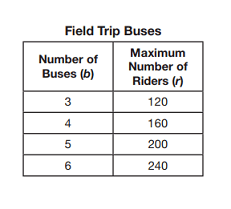
Analyze the relationship between the dependent and independent variables using graphs and tables and/or relate these to an equation.
Write and evaluate numerical expressions involving whole-number exponents.
Identify parts of an expression using mathematical terms (e.g., sum, term, product, factor, quotient, coefficient, quantity). Example: Describe the expression 2(8 + 7) as a product of two factors.
Track each student's skills and progress in your Mastery dashboards