Loading...


SECOND QUARTER MIDTERM EXAM TLE ICT- 8 SPECIAL PROGRAMS
Quiz by Eden Javier
Tag the questions with any skills you have. Your dashboard will track each student's mastery of each skill.
The type tool has an icon that looks like what letter?
When the Type Tool is selected, the mouse cursor changes into what is commonly known as
This tool add a text to your Photoshop Document.
What is the keyboard shortcut for Type Tool?
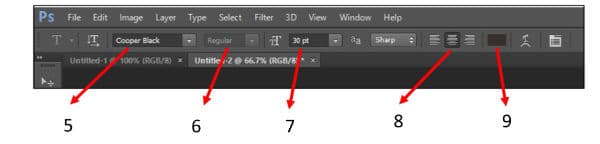
Name the element of the Type Tool interface on item number 5.

Name the element of the Type Tool interface on item number 6.
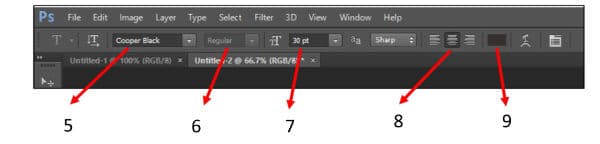
Name the element of the Type Tool interface on item number 7.

Name the element of the Type Tool interface on item number 8.
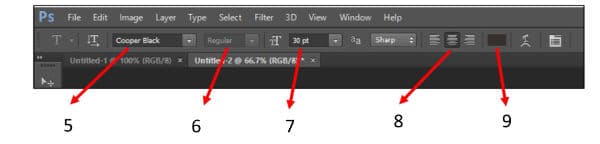
Name the element of the Type Tool interface on item number 9.
Which of the following is not an example of photo editing software?
What does PNG stand for?
What does JPEG stand for?
What does PSD stand for?
What is the key board shortcut to zoom-in a document file in photoshop?
What is the keyboard shortcut to zoom-out a document file in photoshop?
What is the keyboard shortcut to display your photoshop document in 100%?
What is the keyboard shortcut to display your photoshop document fitted to screen?
If you want to select an image in a box or square shape, what tool will be used?
If you want to select an image in a circle shape, what tool will be used?
What is the keyboard shortcut for Marquee Tool?
What menu will be used to crop an image?
What menu will be used if you want to copy a selected image?
What menu will be used to select the inverse part or the outer part of your selected image?
What is the keyboard shortcut for inverse selection?
After you have inversed the selected part, what will you click to remove the outer part of the image?
What is the keyboard shortcut to deselect an part of an image?
What is the keyboard shortcut to select a layer where it allows you to resize and rotate the layer?
This will eliminate transparent part of your image.
In cropping an elliptical image, in what menu can you find the trim option.
If you want to save your image which supports transparency, what file type will you use?
If you open a jpeg image, this layer will be called "background" and will have a lock icon, how will you unlock the layer?
To select multiple contiguous layers, what should be done?
To select multiple noncontiguous layers what should be done?
What menu will be used to add a new layer?
What is the icon used to add a new layer?
What icon is used if you want to add a layer style such as shadow, stroke and other effects?
What icon is used to organize or group your layers?
What icon will be used, if you want to permanently remove a layer in your document?
What menu will be used to display layer panel if it is hidden?
You can add a layer without creating a new document.
This is similar to the default mode the only difference is when the opacity level was changed the image is converted into dots.
This compares each pixel value of the upper layer to its counterpart's pixel value of the lower layer and chooses the darker of the two to display.
This darkens the lower layer based on the darkness of the upper layer.
This works like multiply but the results are more intense.
This compares the two layers, pixel for pixel and uses the lightest pixel value.
This brightens by lightning the lower layer based on the lightness of the upper layer.
This works like screen but with more intense results.
1. You can crop and edit an image even if the file is lock.
1. An image can be added in your new document without using the PLACE option under file.
This palette allows to add more style to your text such bold, subscript, superscript and other character formatting.
