Loading...


LiDAR_Checking method
Quiz by Jane Oliveros
Tag the questions with any skills you have. Your dashboard will track each student's mastery of each skill.
What you should do first with least 1-2 mins per each camera just to see the whole clip scenario.
Check the _________ by pressing “I” to see if the clip is return or not before proceeding to checking all label.
You can press the ___________ Icon to access all the cuboids in all frames.
You can filter the annotations to verified attribute, to check the accuracy of “YES” attribute cuboid then press “ . “ or “ > “on your keyboard to select next cuboid.
While checking the accuracy also check the cuboid movement by selecting a cuboid then press “O” to display the __________ that is shown in the image below.
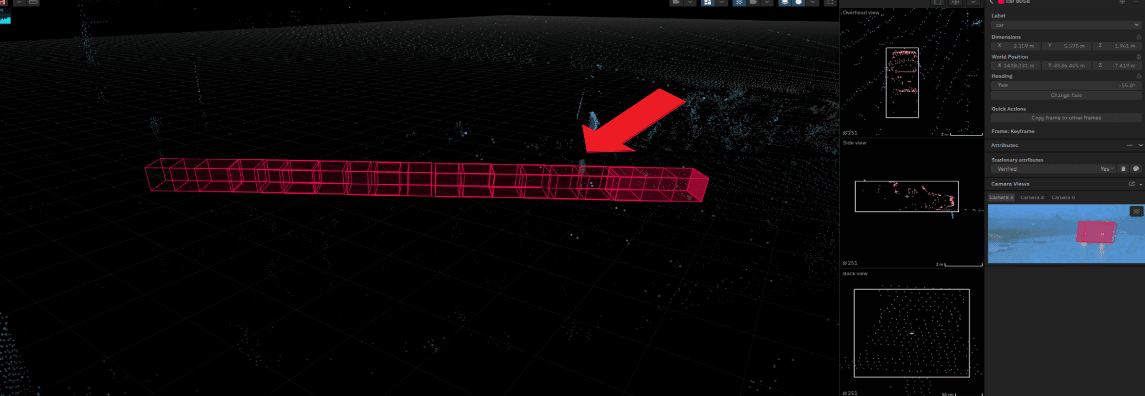
After checking all the accuracy of all verified “YES” cuboid. Go to all camera view to check if there’s a ____________ and wrong attribute in the clip.
If we see a mistake on the clip the Checker can add comments to where the mistake can be found, the Checker can also add what mistake the annotator made and what changes he/she needs to do.
Before submitting the clip make sure that you fix all the warning errors in all frames. You can easily access all the warnings by pressing “_____ “ for quality assistant.
After you check the clip you can choose either you Reject, Make changes or Accept the clip by clicking the ___________.
After you check the clip, you can get or copy the task ID in ____________.