Loading...


Multitasking and internet safety Grade 4
Quiz by Mr. Rowe
Tag the questions with any skills you have. Your dashboard will track each student's mastery of each skill.
What is the best way to create a strong password?
If a website asks for your personal information, what should you do?
What should you do if a stranger messages you online?
Why is it important to ask a grown-up before downloading something?
What should you do if you accidentally clicked on a suspicious link?
What is cyberbullying?
What should you do if you see cyberbullying happening to someone else?
Which of the following is a safe online activity?
What kind of information should you keep private online?
Websites with ‘https’ in the address are usually ________ to use.
Never arrange to meet someone you only know from the __________________.
Never share your ___________ with anyone except a trusted adult.
Cyberbullying should always be reported to a ________ adult.
If you see something inappropriate online, tell a friend immediately.
If you receive a suspicious email, you should first open and read before sending.
Read your email and listen to music on YouTube is consider.
Users can only multitask with one program open that is being used
Which of these devices can multitask?
Give the name of the selected icon in the picture.

Type the correct name of the icon that is selected in the picture.

Which two keys should the user press to get the multitask option shown in the picture?
_____________ and _____________

We can select the following multitasking option in the picture by pressing keys on the computer keyboard

Which icon or keys should users select to get the multitasking option presented in the picture?

Cycling between applications you are using on the computer is known as ?
The image shown is NOT an example of multitasking on the computer.
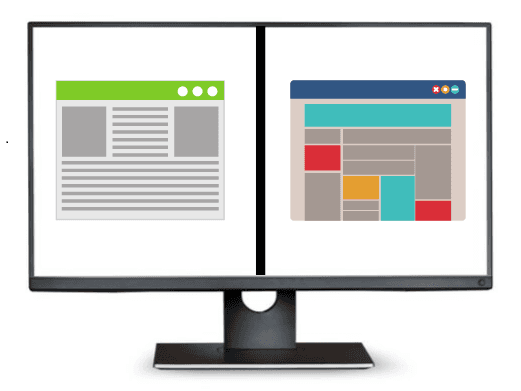
State the name of the multitasking technique the user of the computer in the picture is using to get his work done.

Split screen is a feature that allows you to divide your computer monitor display into only two sections.
Multitasking on the computer CANNOT be done by clicking the open application icons on the taskbar.
